
Using Python in
Build Alpha
Build Alpha is 100% no-code — but you can extend it with custom Python signals. Write your proprietary indicator logic in Python, and Build Alpha treats it like any other building block: combinable, optimizable, and validated with 12+ robustness tests. This step-by-step tutorial walks through the entire process.
Build Alpha and Python
As you know, Build Alpha allows users to create, stress test, and even generate tradable code without ANY programming at all. It also allows traders to use a custom drag and drop signal builder to create unique rules and signals to test alongside the pre-built Build Alpha signal library of over 7,000 signals — and growing.
However, I have now added a Python environment to give traders even more freedom. Traders now have the ability to code their own signals in Python and optimize these signals in the Build Alpha strategy creation engine.
You Do NOT Need Python
You do NOT need ANY programming skills to use Build Alpha. If you WANT to, you can now use Python to create signals — but you do NOT have to, as Build Alpha will work without. This is just an upgrade for the more sophisticated traders out there. For the philosophy behind combining Python with Build Alpha, see Python for Signals, Build Alpha for Scale.
Step 1: Open the Custom Indicator Editor
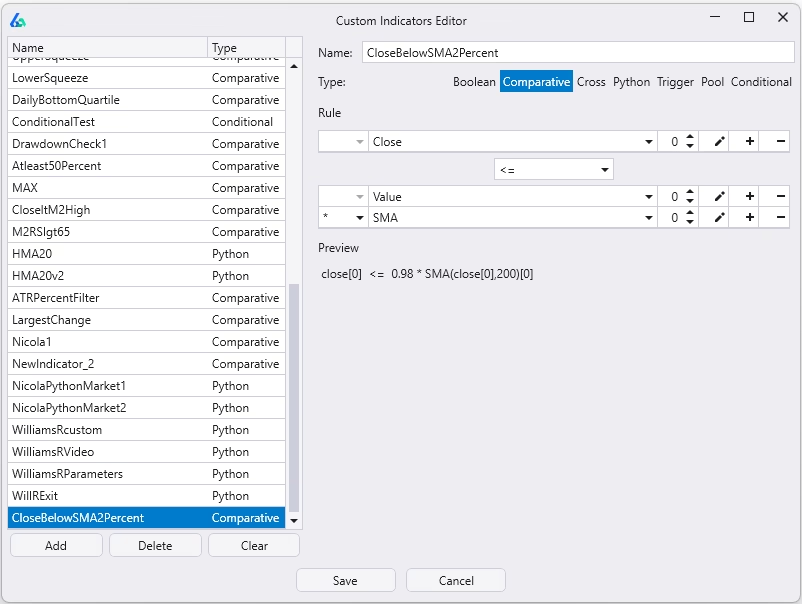
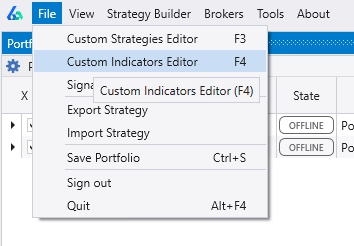
Go to File → Custom Indicator Editor. This opens the custom indicator editor pictured above.
Step 2: Add New Indicator and Select Python
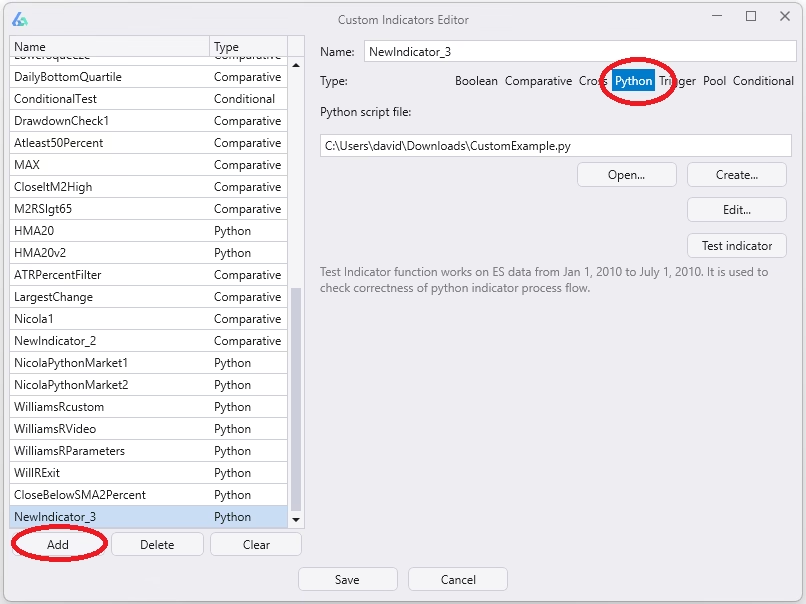
In the lower left of the new window that opens, select Add and then near the top of the interface click on Python. Both of these are circled in red below.
Step 3: Create and Save the File
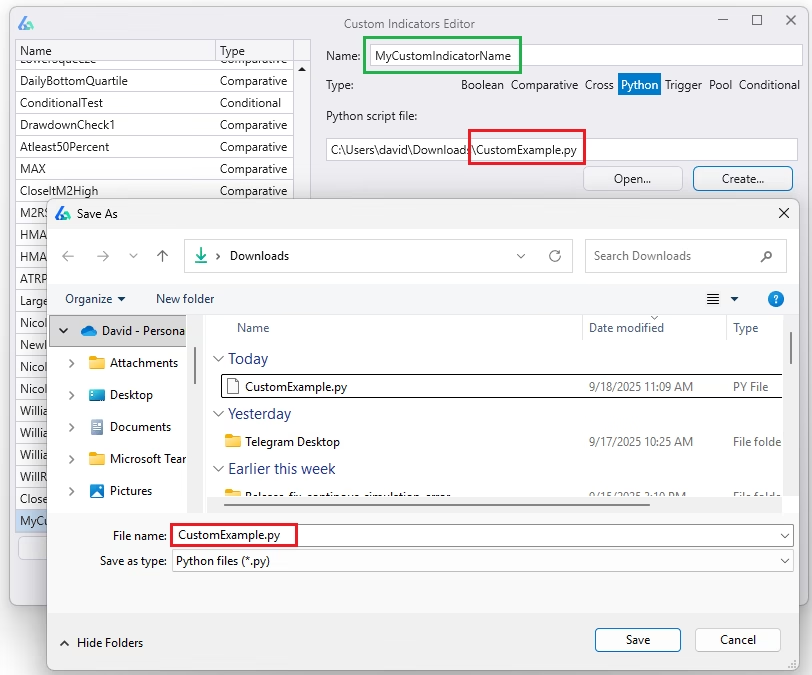
Hit the Create button which will open your File Explorer. Name the file that will contain your custom Python script and select an appropriate file location to save the file.
You can also give your indicator a name in the top Name input box. This is the name that will appear in the main Build Alpha signal selection window.
In the example below I’ve named my custom Python indicator “MyCustomIndicatorName” (green box) and named the file “CustomExample.py” (lower red box) while saving to my File Explorer.
Step 4: Add Your Code and Save
Build Alpha then produces a simple-to-use template and we just need to add our custom code in the GetCustomSignal function. I have added a small moving average example below.
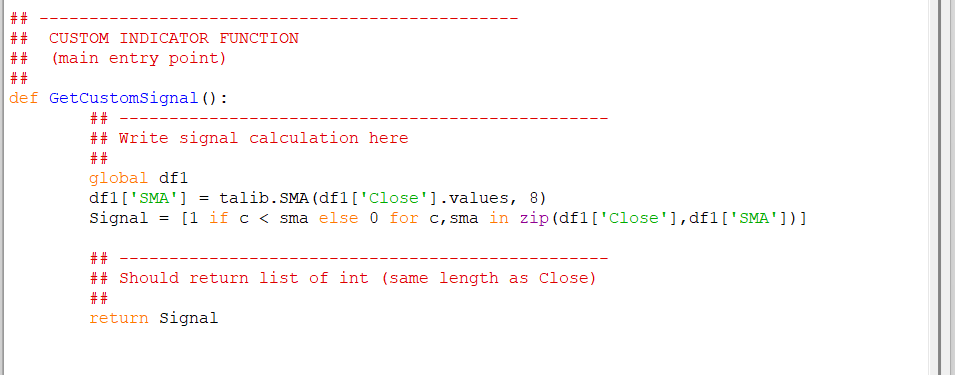
The only requirement is that we return a Signal list with the same length as data rows in our input data. That is, we must have a true or false signal for every bar. Do not drop NaNs.
Step 5: Custom Parameters (Optimizable)
Build Alpha also supports custom parametric Python signals. We can add variables between these comment sections like this:
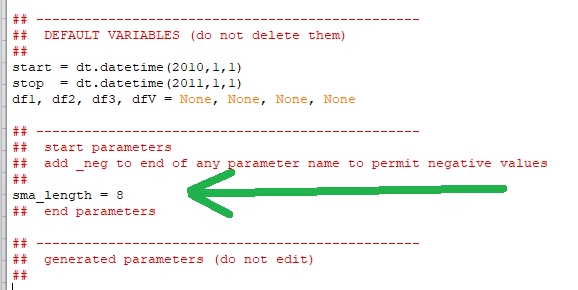
Then edit your code in the GetCustomSignal function to utilize your new parameter variable. Here is mine edited below. Notice I have removed the magic number 8 and replaced it with the sma_length variable which stores the value 8 at the moment.
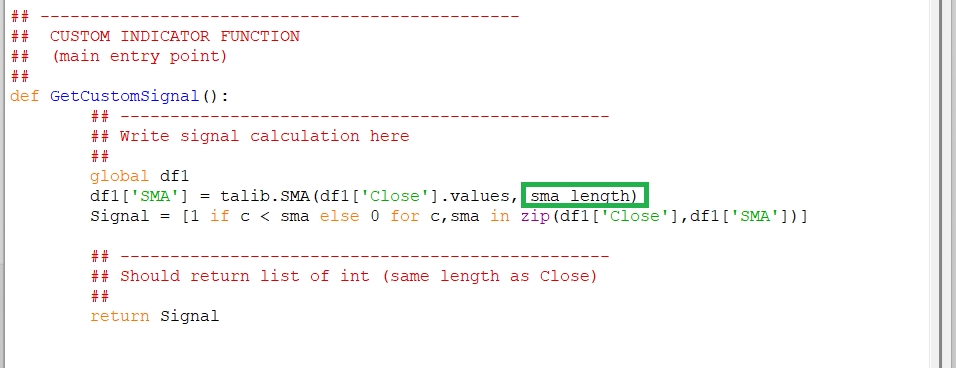
Now save your custom Python script and hit Save on the Build Alpha Custom Indicator Editor window. The indicator is now saved and will appear in your Custom Signals list of the main Strategy Builder interface.
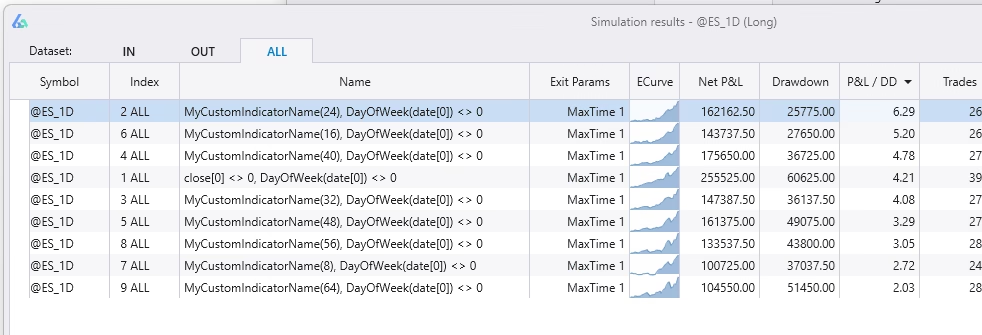
If you click on your custom signal in the Strategy Builder you will now see the ability to edit the parameter range for any custom parameters you have added to your Python script. Below I have set to optimize mine as 8, 16, 24, 32, 40, 48, 56, 64.
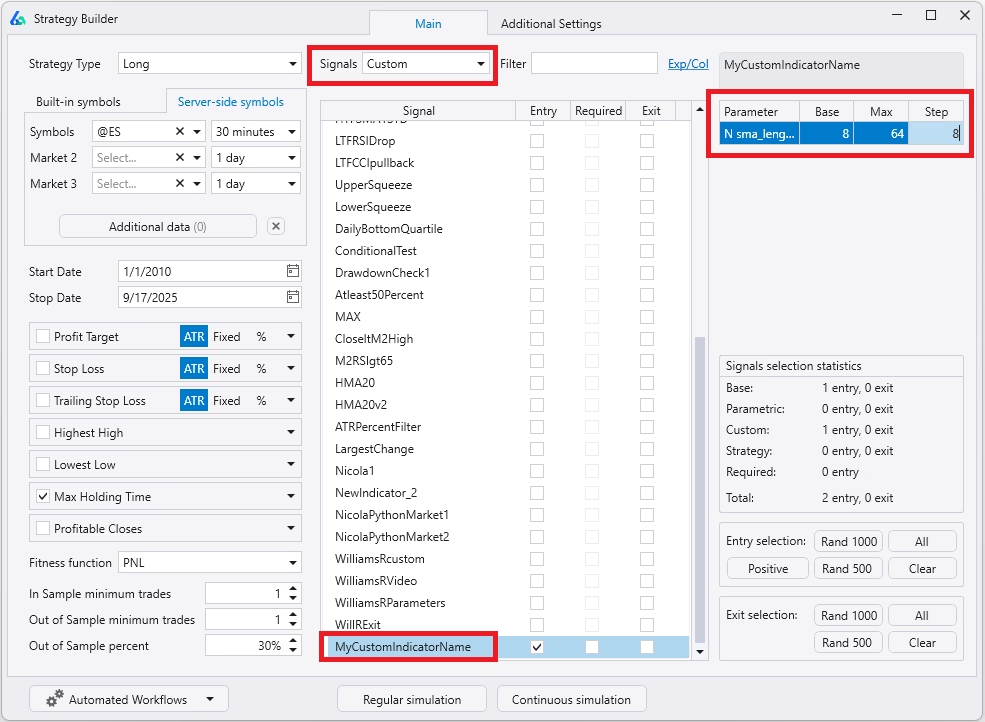
Running a simulation will then show all possible parameter variations for your custom Python indicator. I set two max rules and required the second rule to be Not Sunday (always true) so each row has one variation of my custom Python signal.
The Power of Parametric Signals
This is where the hybrid workflow becomes extremely powerful. You define the signal logic in Python. Build Alpha handles the parameter optimization, signal combination, and robustness validation — all without you writing a single line of optimization code. Build Alpha’s genetic algorithm can combine your custom Python signal with any of the 7,000+ built-in signals to find the best strategies.
Installing Python Libraries for Build Alpha
Build Alpha’s Python environment is a full Python environment which means we can import any external Python libraries. The above example imported the famous technical analysis library, talib, to create a moving average trading strategy with Python.
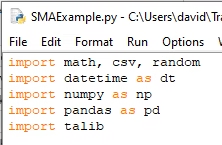
You can add any external Python library. The Build Alpha Python installer includes talib, scikit-learn, scipy, matplotlib and many other essentials.
Install a New Python Library
If you do not have talib installed or want to add a new Python library, then open a command terminal and navigate to your Python directory.
You can type cmd into the Start menu of most Windows devices. If you used the Build Alpha installer then talib is included. However, you can navigate to your Python directory like this below:
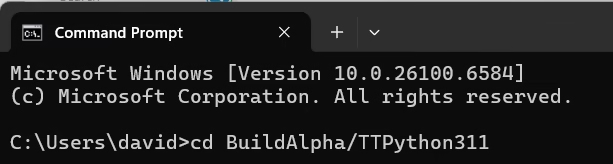
Please note you can always check the folder inside Build Alpha for the most recent version of Python. At the time of writing we are using Python 3.11 so the folder name is TTPython311.
Then install talib using the following prompt below. Notice the hyphen in ta-lib.
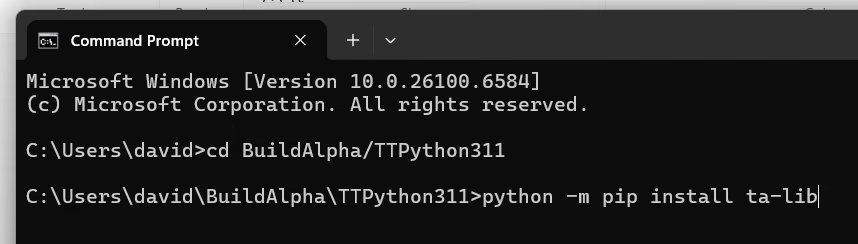
Hit <ENTER> and you have now added a new library for use in Python for Build Alpha. You can import the new library to the top of any new Python script and Build Alpha will recognize it.
Algorithmic Trading with Python
Python is the fastest growing and most versatile programming language, making it extremely attractive for quantitative traders and developers. Many algo traders prefer Python due to its easy-to-read code and simple syntax. Python does not require code block brackets or semicolons to end statements, but is still object-oriented — providing a great mix of ease and flexibility.
Python for algorithmic trading is growing every day with new libraries and popular libraries being updated. Talib is the most popular library, but many more advanced libraries continue to emerge. Algo trading with Python has never been easier.
However, connecting to exchanges, handling live price data, and coming up with trading ideas can be a daunting task. The best part about coding is coming up with new signals. Build Alpha takes care of the heavy lifting — enabling Python traders to simply do the fun part: signal creation.
Validate and Export
After strategy generation, validate survivors with the full robustness suite — noise testing, Monte Carlo simulation, walk-forward analysis, vs random benchmarking, and out-of-sample testing. Then generate fully automated code in your platform of choice:
Python (Interactive Brokers)
Full Python code with IB API integration for automated trading with Interactive Brokers.
NinjaTrader 8
Complete NinjaTrader strategy code ready to deploy.
TradeStation / MultiCharts
EasyLanguage code for TradeStation and MultiCharts.
MetaTrader 4/5 & More
Summary
Build Alpha now supports the ability to import custom signals via Python. This is additional functionality for programmers that want to leverage the speed and ease of Build Alpha. Reminder that this is extra and NO programming is needed to use Build Alpha’s built-in signals or drag and drop custom signal builder.
For a deeper dive into why the hybrid Python + Build Alpha workflow is the most practical approach for systematic traders, see Python for Signals, Build Alpha for Scale →

David Bergstrom
Founder, Build Alpha
David Bergstrom is the founder of Build Alpha. His background is in machine learning at a market-making firm. He has spent over a decade building systematic trading tools used by independent traders, proprietary firms, and hedge funds in 70+ countries.
Questions
Frequently Asked Questions
Do I need to know Python to use Build Alpha?
No. Build Alpha is a fully no-code platform with 7,000+ built-in signals and a drag and drop custom signal builder. Python is an optional extension for traders who already write custom signals. Almost half of Build Alpha users had no prior algorithmic trading experience.
Do I need to rewrite my strategy logic in Build Alpha?
No. You develop your custom signal logic in Python and import it into Build Alpha, where it becomes a building block for strategy generation, validation, and export — without rewriting your strategy in code.
What kinds of Python signals can I import?
Any signal that returns a time-aligned series — boolean or numeric — matching the bar data. Technical indicators, machine learning features, alternative data transforms, sentiment scores, custom filters, and more. If you can code it in Python, Build Alpha can use it.
Can Build Alpha optimize my Python signal’s parameters?
Yes. Define parameters between the special BUILD ALPHA PARAMETERS comment sections in your Python file, set ranges in Build Alpha’s interface, and the genetic algorithm will optimize them during strategy generation — as shown in Step 5 above.
What robustness tests run on Python signals?
The full suite — noise testing, walk-forward, Monte Carlo, vs random, out-of-sample, and more. Python signals are treated identically to built-in signals.
Can Build Alpha export strategies back to Python?
Yes. Build Alpha exports fully executable Python code for Interactive Brokers, as well as NinjaTrader, TradeStation, MetaTrader 4/5, TradingView, MultiCharts, and ProRealTime.
Community
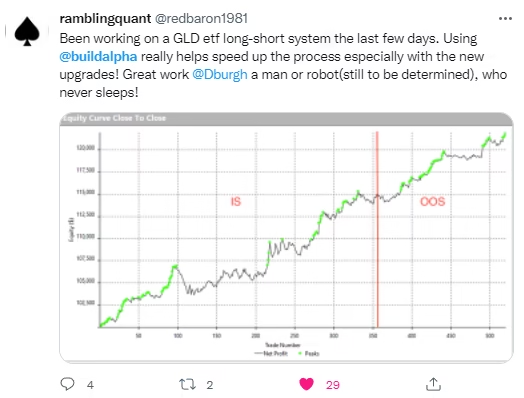
What Traders Say About Build Alpha














Related
Explore More
WorkflowPython for Signals, Build Alpha for ScaleWhy the hybrid workflow beats pure Python or pure no-code.PlatformPython Trading Strategy BuilderFull capabilities of Build Alpha’s Python integration.HubRobustness Testing Guide12+ institutional-grade stress tests explained.TutorialAutomate with Interactive BrokersDeploy Build Alpha strategies via IB’s Python API.
Break Your Strategies
Before the Market Does.
Write custom signals in Python. Generate, validate, and export strategies at scale. No infrastructure to maintain.