Walk Forward Optimization:
Rolling Parameter Validation for Algo Trading
Re-optimize your strategy across rolling time windows and combine the out-of-sample results into one true validation equity curve. If parameters fluctuate wildly, you're curve fitting.
What Is Walk Forward Optimization?
Walk forward optimization (WFO) is a technique used in trading strategy development to evaluate parameter stability across multiple periods of data. It splits the historical data into rolling in-sample (training) and out-of-sample (testing) windows, optimizes parameters on each training window, then tests on the unseen window immediately following it.

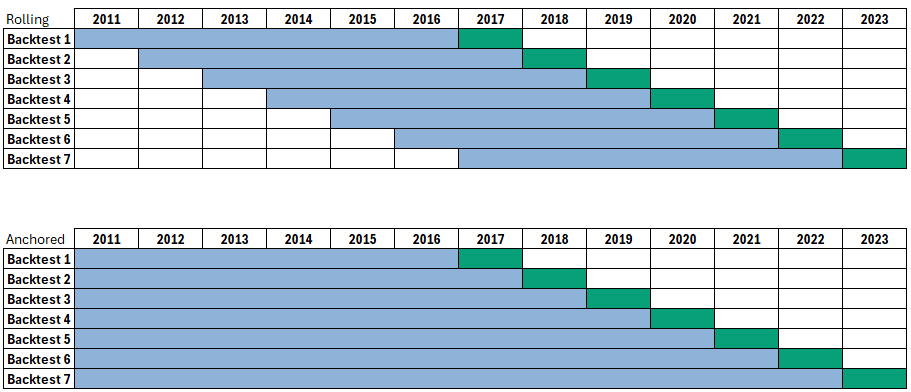
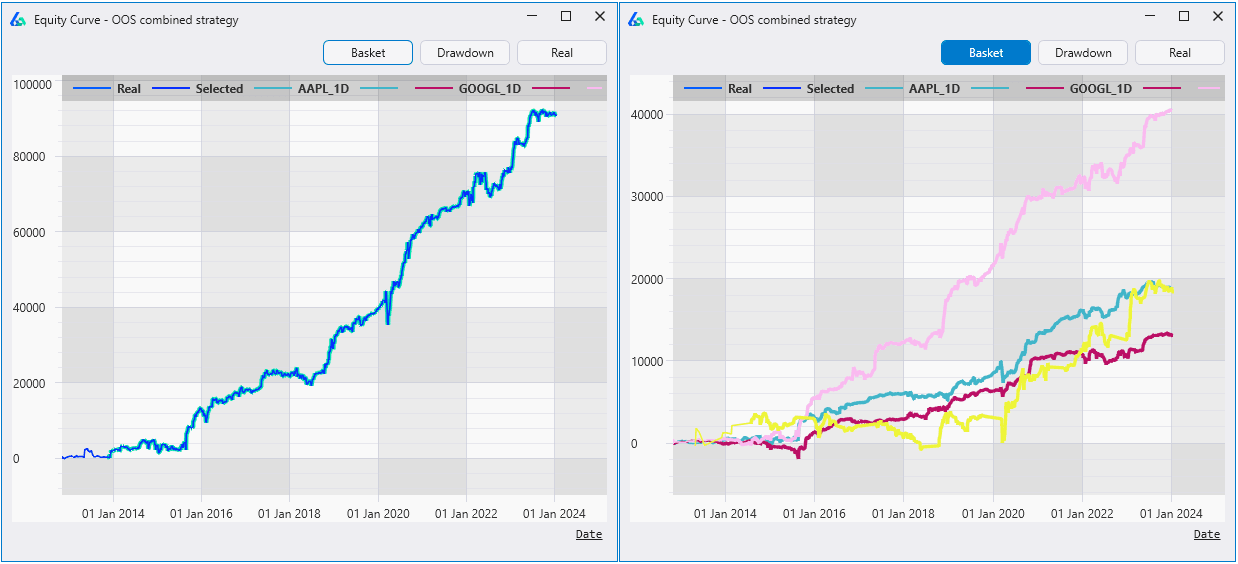
This process repeats until you "walk forward" through the entire dataset. All out-of-sample windows (green boxes above) are combined into one truly out-of-sample equity curve. Simulating how the strategy would have performed if you periodically re-optimized parameters starting back in time.
Core Question WFO Answers
Do the optimal strategy parameters fluctuate wildly over time? If so, it's probably not a robust strategy. Most likely curve fitting. WFO exposes parameter instability that a single out-of-sample test cannot.
Note: Walk forward optimization was originally developed by Robert Pardo in 1992.
Walk Forward Analysis Settings
Walk forward tests have many configurable settings. Understanding each is critical to getting meaningful results rather than misleading ones.
How many in-sample → out-of-sample cycles to perform. More runs isolate different market conditions, fewer runs give each window more data.
What fraction of each window to reserve for testing. A 30% split means OOS is 30% the length of the IS period. More OOS data = harder test.
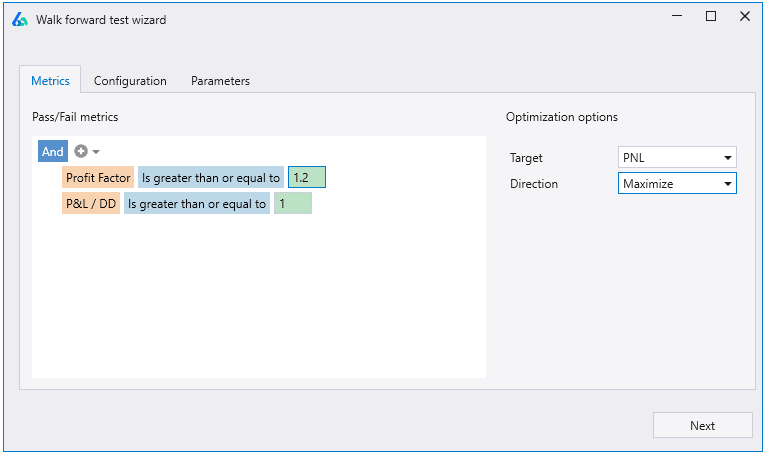
The performance metrics each OOS window must achieve. Set profit factor, CPC ratio, P&L-to-drawdown, or any custom fitness function threshold.
Which parameters to optimize, their ranges, and step sizes. Too many parameters increases overfitting risk, keep the search space lean.
⚠️ Parameter Stability Is the Real Signal
A parameter that jumps from 12 to 47 to 23 to 35 to 55 to 13 across runs is almost certainly curve fitting. Stable or slowly drifting parameters across walk forward windows signal robustness. Odds are you won't find the right parameter setting for live trading if it's wildly unstable.
Walk Forward Analysis Results
Walk forward analysis is only concerned with the out-of-sample periods, the in-sample results are entirely discarded. IS data exists solely to train parameters for each window.
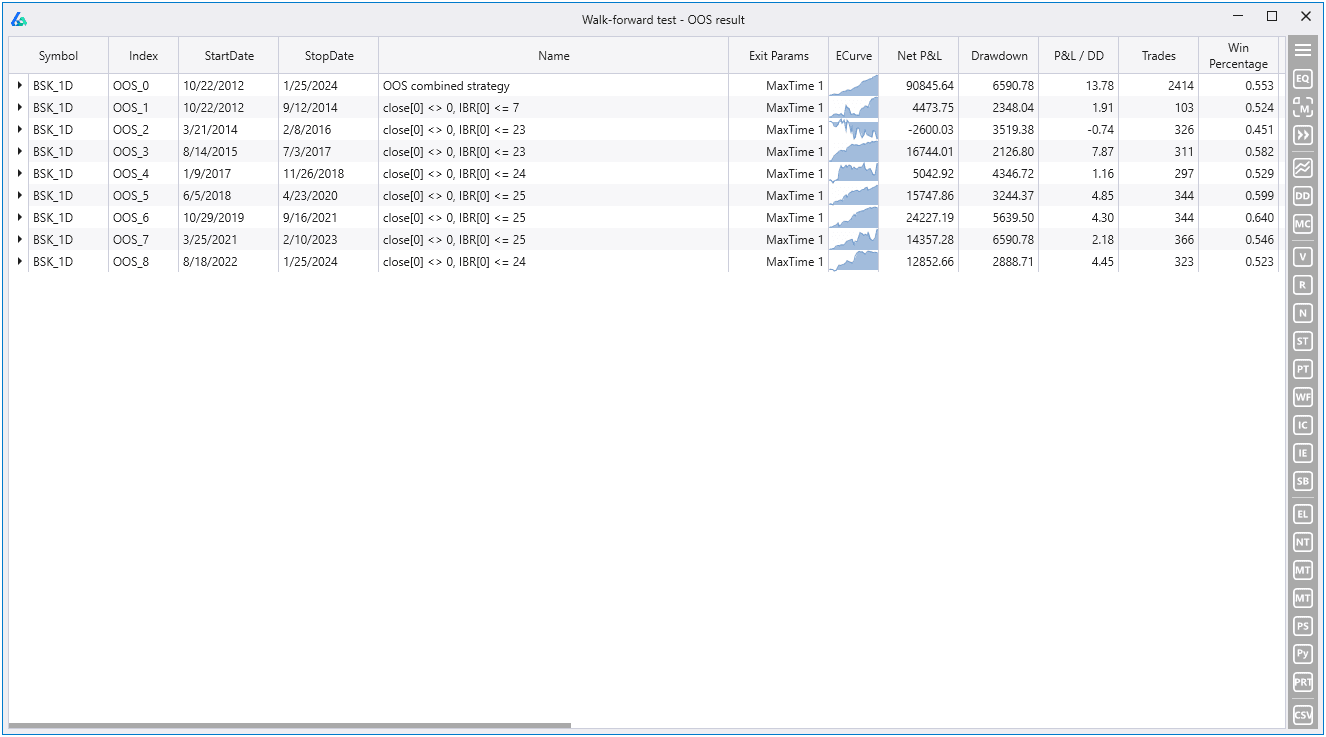
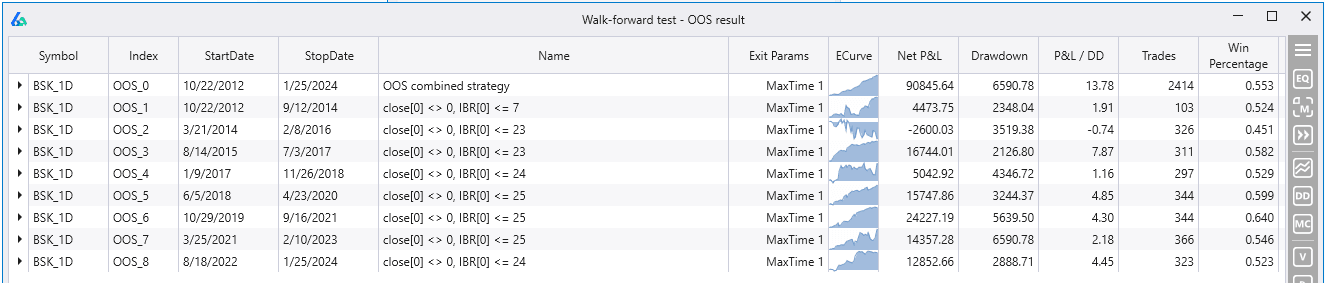
Build Alpha automatically combines all OOS windows into one equity curve (top row) and provides a breakdown of how each individual test period performed, along with the optimal parameters for each run.
The Walk Forward Matrix
There is no single ideal setting for all strategies across all markets. The solution: run a Walk Forward Matrix that tests multiple combinations of runs and OOS percentages simultaneously.
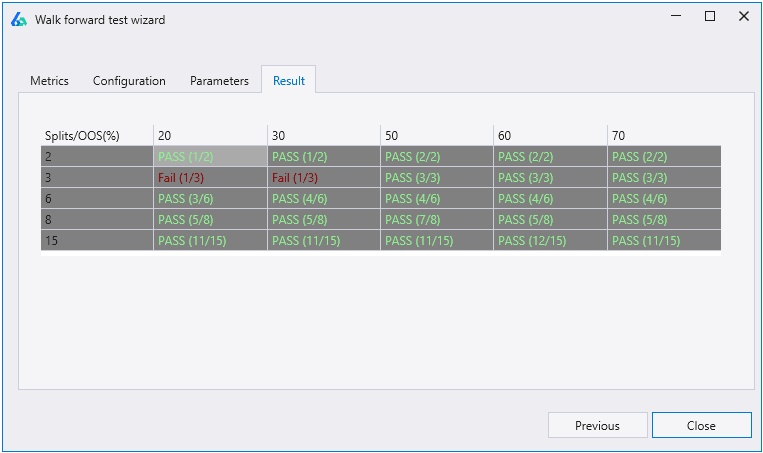
How to Interpret the Matrix
The strategy overfits easily when given more training data. It memorizes noise rather than learning durable patterns.
The strategy requires frequent re-optimization, not ideal if you want a set-and-forget automated system.
Values like 12 → 47 → 23 → 55 indicate the strategy has no stable optimal zone. Almost certainly overfitting.
The strategy passes under many different run/OOS combinations. Parameters stay within ±10% of each other across windows.
Anchored vs. Rolling Walk Forward
There are two variations every trader should understand:
Each subsequent IS period shifts forward. Training data size stays constant. The strategy always trains on the most recent N years. Most professionals prefer rolling. It keeps training and test data sizes consistent.
The IS start date stays anchored. Training data grows with each run. Useful when you believe more history always helps, but you must study how expanding training size impacts parameter selection independently.
Walk Forward Across Multiple Symbols
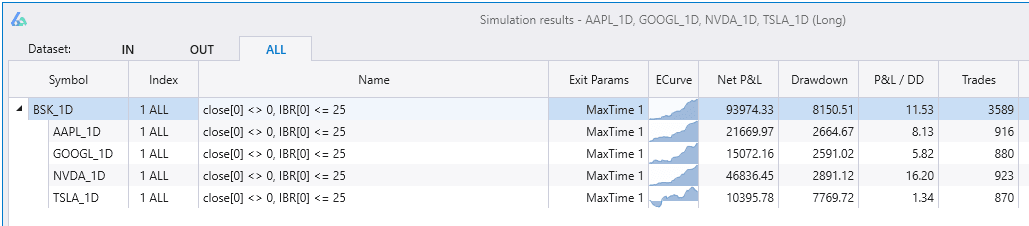
Build Alpha enables walk forward optimization across multiple symbols simultaneously. A strategy traded across various instruments can optimize all parameters across all symbols and return combined results.
Case Study: AAPL, NVDA, TSLA, GOOGL
A simple example using Internal Bar Rank (IBR): buy $10,000 of stock when price closes in the bottom 25% of the bar's range, sell one bar later. Testing across four major stocks:
The strategy rarely changed parameter thresholds during each OOS test period, which is exactly what we want to see. One period deviated down to 7, but most others settled near the original value of 25. This kind of stability is encouraging.
5-Step Walk Forward Setup in Build Alpha
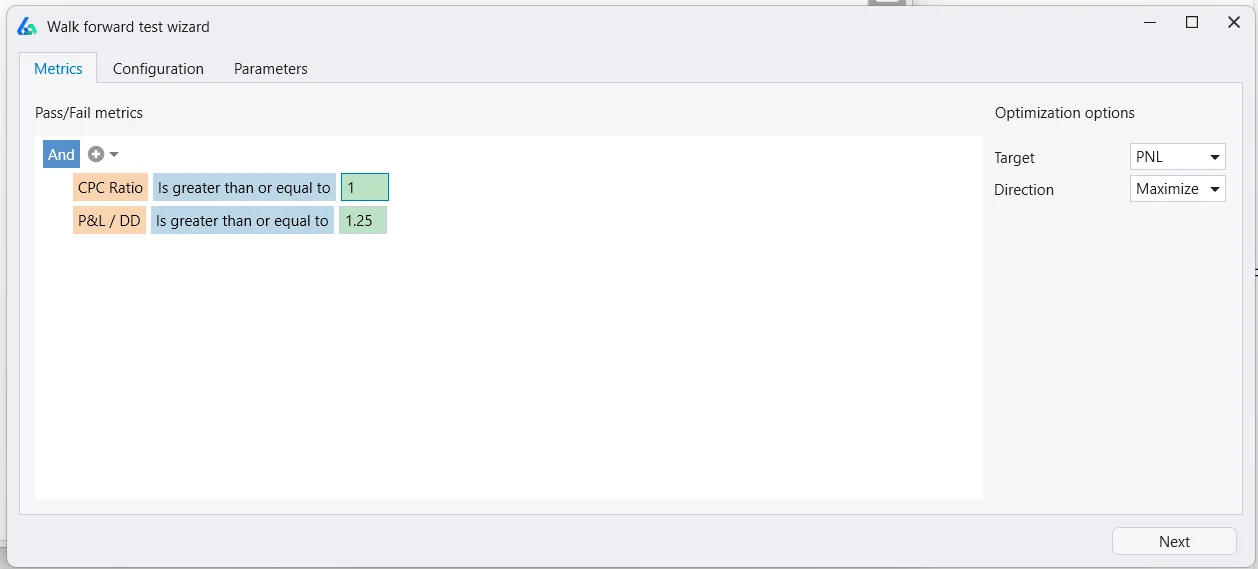
Set Pass Criteria
Use the no-code editor to define what counts as a passing OOS window. Set your target objective function (fitness) and minimum thresholds, e.g., CPC Ratio ≥ 1.0 and P&L-to-Drawdown ≥ 1.25.
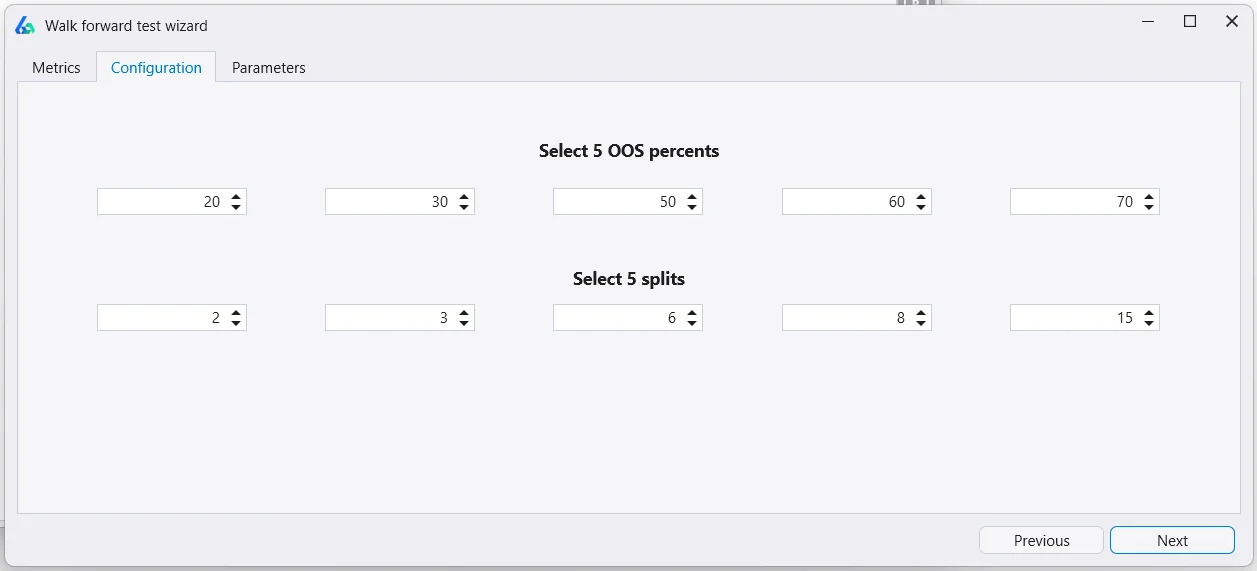
Configure Runs & OOS Splits
Build Alpha runs a 5×5 matrix by default. Customize each cell's OOS percentage and number of splits. Set any input to -1 to disable that combination.
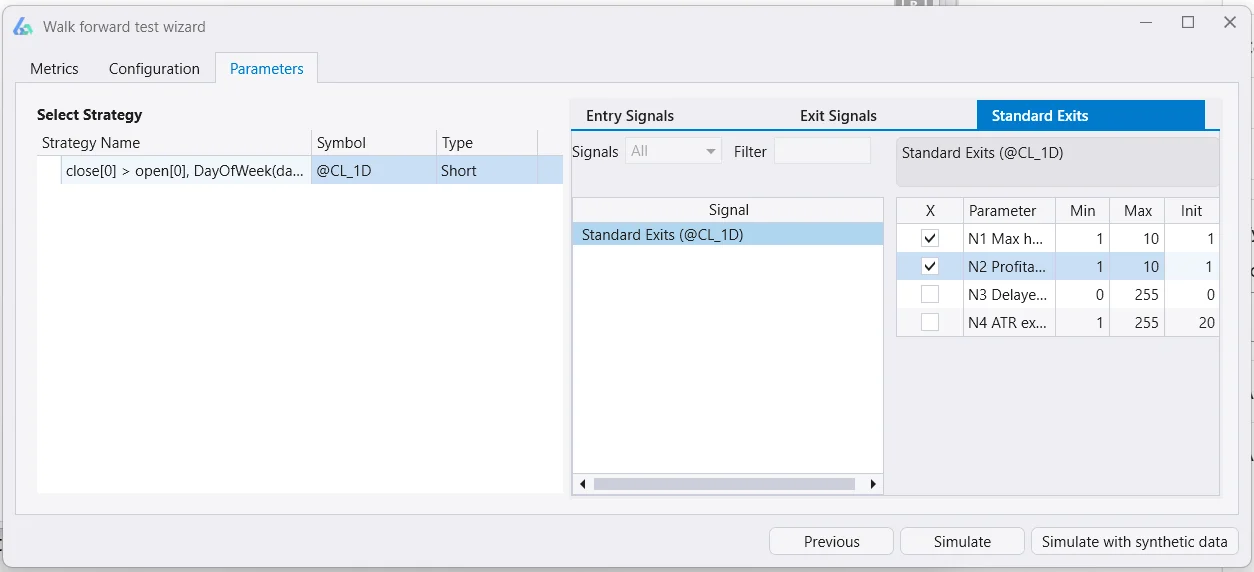
Set Parameter Ranges
Choose which parameters to optimize (entries, exits, hold time, stop loss). Set base, max, and step values to define the search space Build Alpha uses during optimization.
Simulate
Hit Simulate to run the full Walk Forward Matrix. Results show pass/fail scores for each combination of runs × OOS percentage.
Inspect Results
Click any matrix cell to drill into performance metrics, equity curves, and optimal parameters for every split. Validate further with Build Alpha's full suite of robustness tests.
Walk Forward with Synthetic Data
Build Alpha's walk forward optimizer has a unique ability: inject synthetic data into the optimization process. Instead of optimizing only for the single known historical price path, you optimize across many possible price paths, leading to more robust parameter selection.
💡 Why This Matters
Why optimize for the known past when we really need to optimize for various possible unknown futures? Synthetic data lets you test your strategy on alternate realities, price paths that could have happened and might still happen.
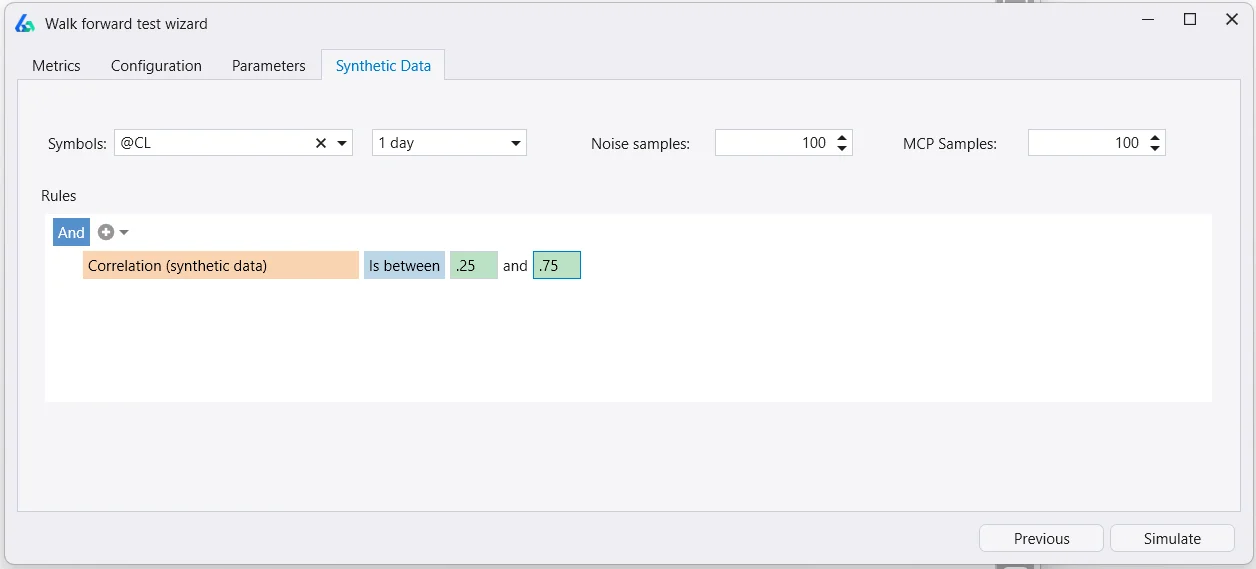
Choose from noise-adjusted data or Monte Carlo permuted data, then set rules to qualify which synthetic series are included. For example: only include series with larger drawdowns than historical data, or with 1.25× annualized volatility.
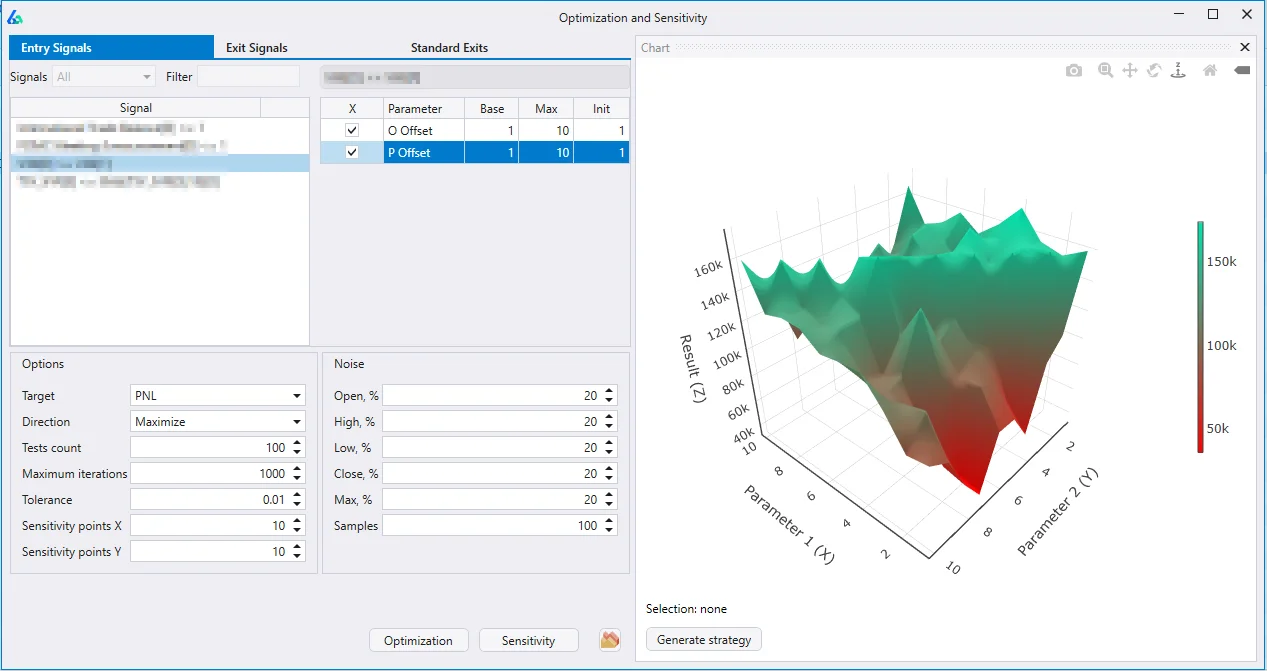
Synthetic data results are included in the Pass/Fail scoring. Parameters that work across many synthetic paths are far more likely to work on future live data. For more depth, see Noise Test Parameter Optimization and Building Trading Strategies on Synthetic Data.
WFO Pitfalls to Watch For
Walk forward testing is powerful but introduces its own risks. The robustness testing pillar page covers these in detail, but the key pitfalls:
⚠️ Data Leakage
Each data split creates leakage risk. A strategy using a 200-period moving average will reference data from the previous IS period for the first 199 bars after each split. More splits = more leakage. Account for this when designing your walk forward test.
Other considerations: walk forward analysis can give a false sense of security if the pass criteria are too lenient, if there aren't enough trades per OOS window, or if you cherry-pick which matrix cells to report. The complete Robustness Testing Guide discusses these trade-offs alongside Monte Carlo simulation, noise testing, and Vs Random, all of which should be used alongside WFO, not instead of it.
WFO in the Automated Workflow
Walk forward results can feed directly into Build Alpha's automated strategy generation pipeline. Set WFO pass/fail as one of many automated filters, alongside out-of-sample testing, Monte Carlo, noise test, and Vs Random, so you only review strategies that survive everything.
The end result: you spend your time on the small number of strategies that pass your rules, not sorting through noise. More on the full automatic strategy generation workflow.
Takeaways
✓ Key Takeaways
- WFO reveals parameter stability over time, wildly fluctuating parameters signal overfitting
- Use the Walk Forward Matrix to test multiple run/OOS combinations simultaneously
- Synthetic data integration lets you optimize for unknown futures, not just the known past
💡 Need to Know
- Rolling WFO (fixed window) is preferred by most professionals over anchored (expanding window)
- More splits = more data leakage, account for indicator lookback periods
- WFO alone is not enough, combine with the full robustness testing suite
Walk Forward Optimization FAQ
Related Deep Dives
David Bergstrom
A decade-plus in professional trading as a market maker and quantitative strategy developer at a high-frequency trading firm with a CME seat. Self-taught C++, C#, and Python programmer specializing in data science, machine learning, and trading strategy development.
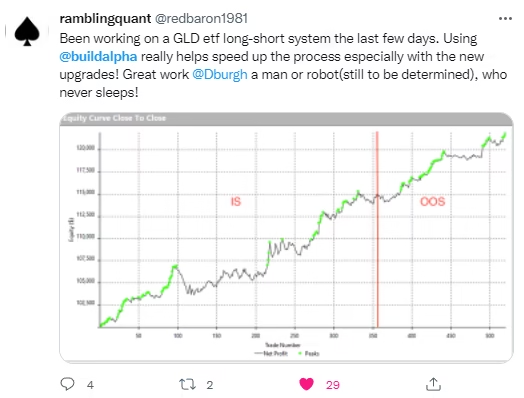
What Traders Say About Build Alpha








Optimize for Unknown Futures,
Not the Known Past.
Walk forward matrix + synthetic data integration. No coding required.