Build Alpha Custom Signal Editor
How Build Alpha Works
Build Alpha is no code strategy builder powered by a genetic algorithm that automatically creates thousands of strategies based on the trader’s desired inputs. This rapid prototyping can save traders thousands of hours navigating financial data to find trading opportunities.
Build Alpha comes with a point-and-click built-in signal library that covers more than 5,000+ signals from everything from
- Price Action
- Candlesticks
- Chart Patterns
- Volume
- Volatility
- Seasonality
- Technical Analysis Indicators
- Market Breadth
- Term Structure
- Yields and Spreads
- Vix and Volatility measures
- Options Flows
- Economic Data
- Sentiment
- Weather
- And More
The latest edition to Build Alpha allows traders to expand the built-in signal library with their own custom signals with no coding. These custom signals can be used in conjunction with the built-in signals, and all passed to the strategy engine for rapid testing.
Custom Signal Editor Basics
How to Open
From the portfolio window select File >> Custom Indicators Editor or hit F4. This will open the interface below.

The left-hand side shows previously created custom indicators and the ability to add a new one, delete an existing one, or clear all. You can give your indicator a custom name in the top of the interface before selecting the type of indicator to create.
Different Types
Boolean
True or False indicator. This would only generate a trading signal when the expression is evaluated to true. This can be as simple as the current close is above the previous close or the current day is Monday.
Comparative
Comparative indicators use relational operators to compare one expression’s numerical value to another. Common operators include
- Greater than
- Greater than or equal to
- Less than
- Less than or equal to
- Equal to
- Not Equal to
Crossover
Straightforward as the name suggests. This would be when one indicator or value crosses over another indicator or value. For example, the closing price crosses above a simple moving average.
Python
The ability to extend Build Alpha with custom coded python indicators is also possible. More on this later.
Trigger
Trigger signals require two separate signals to occur within N bars of each other. For example, price trades below a lower Bollinger Band and then within 5 bars closes above the simple moving average (middle line of the Bollinger Band indicator).
Signal Pool
A Trading Signal Pool combines multiple signals into one. For instance, ten signals can be simultaneously true and result in a score of 100%. Alternatively, all ten signals can be false and result in a score of 0%. And of course, the ten signals can take any state in between all true or all false. A Signal Pool allows us to create a pool of any number of signals, visualize their combined behavior and set thresholds for when to trade (or not trade).
Conditional
A conditional signal is comprised of three trading rules. A conditional rule, a true rule and a false rule. If the conditional rule is true then the system follows the true rule; if the conditional rule is false then the trading system follow the false rule.
For example, a conditional signal could check if price is above the 200-SMA.
Above: exit on early weakness, like a close below the previous bar’s low.
Below: exit on any strength, like a close above the previous bar’s high.
This lets the system adjust its behavior to different market environments.
Overlay Functions
Build Alpha also permits Overlay functions or the ability to put indicators, values, or expressions inside another function. This can create more complex indicators or permit proper smoothing when necessary. Below is the list of Overlay functions available to date.
Average
Calculate the average value of a custom expression over the last N bars
Count
Count the number of times a custom expression has occurred in the last N bars
Highest
Find the maximum value of a custom expression over the last N bars
Last True
Returns how many bars ago a given signal was true.
Log
Get the natural log of a custom expression over the last N bars
Lowest
Find the minimum value of a custom expression over the last N bars
Most Recent
A function that takes two input signals, such as Close[0] > Close[1] and RSI(2)[0] > 90 and will return a 1 or a 2 depending on which was true more recenty. Great for regime detection.
Normalize
Normalize or rescale a custom expression between any two values. This can scale custom indicators or account for contextual information.
Pattern Correlation
Calculates the correlation between two input signals over a rolling lookback period.
Pattern Match
Takes an input signal series and an integer (3 or 4) to find sequence of true or false signals over the last 3 or 4 bars. TTT is 1, TTF is 2, etc.
Percentile
Find the percentile of a custom expression over the last N bars. Percentile rank determines how many values were below the current value. For example, a returned value of 95 would mean that 95% of all other values are below the current value.
Power
Take a custom expression to any (positive) power.
Standarize
Fear your custom expression is not normally distributed? Standardize it to express its values in standard deviation terms instead. This subtracts the mean and divides by the standard deviation.
Standard Deviation
Calculates the standard deviation of an input series over a rolling lookback period.
Sum
Sum a custom expression and return value over the last N bars
Weighted Signal
Takes two input series and sums their respective weighted average of true signals over a rolling lookback period.
Creating a Custom Indicator Step by Step
Let’s create a custom indicator that monitor the 3-period Relative Strength Index and only trades if the 3-period RSI is below 15 in seven or more of the last 10 bars.
This arbitrary indicator will force us to edit the parameters and use an overlay function.
Open Indicator Builder
File >> Custom Indicator Editor or simply hit F4. In the lower left, hit the Add button to create a new custom indicator. Let’s name it BlogExampleRSI3. You can (and probably should) think of a more descriptive name.

Choose Type of Indicator
Select Comparative so we can fully utilize the full range of the custom indicator builder.
Edit the Custom Signal
Change Math Operator
We do not need to do this in this example but if you wanted to add values together or multiply them you can simply click on the left-hand column of each row to modify the math operator. Here is an arbitrary example adding the Close Price to the Moving Average and dividing it by the Volume.

Now back to our RSI3 example…
Add or Subtract a Row
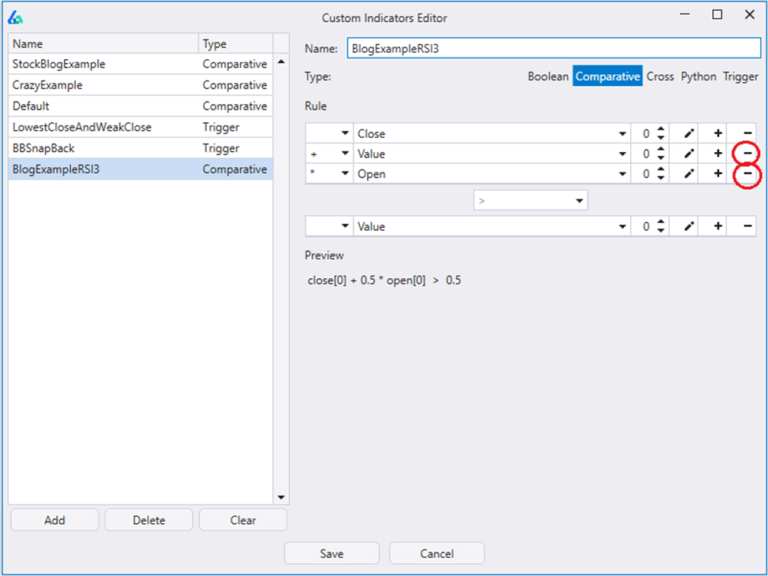
First, I am going to delete the two subsequent rows in the top expression as they are not needed. I do this by hitting the subtraction sign.
Change Expressions
Next, we will change the top expression to be the Overlay function Count. In the drop-down list it will appear as ‘Count f’ where the ‘f’ signifies it is a function.

Edit Parameters
Click on the small pen to edit the parameters. Since we are editing an Overlay function, we will be prompted with a new window to provide an input expression to the Overlay function. This is where we will add our 3-period RSI is less than or equal to 15.
Here’s a quick video showing all the necessary steps

Change Comparisons
The default relational operator is greater than. Let’s change to Greater Than or Equal to which is long-hand for ‘>=’.

Change Values
Finally, we want this count of RSI occurrences to be seven or more. We can click the small pen next to the ‘Value’ expression to change the value to seven.

Parameters and Optimizing Custom Signals
All custom signals are also optimizable or parametric. That is, create one custom signal and Build Alpha's strategy engine can optimize and find the optimal parameter settings. After you create a signal, you can click to highlight a custom signal and modify its parameters.

Advanced Custom Signals
Trigger Signals
Trigger signal is the combination of two signals occurring within a specified time window. The main signal is occurring on the current bar and the trigger signal has occurred at least once in the last N bars.
A simple example can be
- Closed down 2% or more once in the last 5 bars
- Closed in the top 20% of the day’s range
This could be a potential reversal bar and adds context to the strong close in the fact that we had a large down day recently which could have been exhaustion.
The important point is not this specific signal, but the idea of adding sequence to your signals to add context.
Read More
Triggers Signals and Testing Across Markets
Python Signals
For those learning to program or with the ability to do so, Build Alpha can be extended via python. Traders can add custom signals via python and add them to the strategy engine alongside any other built-in or custom Build Alpha signals. These can even be optimized by Build Alpha now.
I spoke specifically about this functionality here
Signal Pools
Select many signals and only trade when a certain percentage of them are true (or untrue). Combining weak predictors into one stronger predictor is a form of ensembling. I wrote about ensembles and trading here and you can read specifically about Trading Signal Pools here.

Generate Code or Track Live
All custom signals created with the graphical user interface, including Trigger Signals and Overlay functions, will have fully generated code for all the supported platforms such as
- TradeStation
- MultiCharts
- NinjaTrader8
- MetaTrader4
- MetaTrader5
- TradingView
- Pro Real Code
- Interactive Brokers (Python)
Simply click on a strategy that uses any custom signal and hit the Generate Code button of choice.
There is also the ability to monitor ANY custom signal inside Build Alpha using the real-time data connections from TradeStation, Interactive Brokers, Quote Media, and Binance. More to come.
Sigma Score Custom Signal Example
A while back I wrote a blog featured on See It Market discussing tracking monthly and annual sigma scores to potentially identify periods of market stress. Here’s a link to the original blog: Tracking Sigma Scores Of Price Changes For Regime Shifts – See It Market
I made a quick video showing how to recreate the Sigma Score signal here:
Final Thoughts
Build Alpha has over 5,000-plus entry and exit signals to choose from to build automated trading strategies but now the software has the ability to add custom signals to the strategy engine from a no code interface. This makes Build Alpha the most flexible no code strategy builder for all traders. There are various types of different signals that can be created and the ability to use overlay functions for sophisticated use cases. Contact me directly with any questions about what can be done with this feature.
Author

David Bergstrom – the guy behind Build Alpha. I have spent a decade-plus in the professional trading world working as a market maker and quantitative strategy developer at a high frequency trading firm with a Chicago Mercantile Exchange (CME) seat, consulting for Hedge Funds, Commodity Trading Advisors (CTAs), Family Offices and Registered Investment Advisors (RIAs). I am a self-taught programmer utilizing C++, C# and python with a statistics background specializing in data science, machine learning and trading strategy development. I have been featured on Chatwithtraders.com, Bettersystemtrader.com, Desiretotrade.com, Quantocracy, Traderlife.com, Seeitmarket.com, Benzinga, TradeStation, NinjaTrader and more. Most of my experience has led me to a series of repeatable processes to find, create, test and implement algorithmic trading ideas in a robust manner. Build Alpha is the culmination of this process from start to finish. Please reach out to me directly at any time.