TradeStation Strategy Generator
(EasyLanguage)
TradeStation is powerful for backtesting and automation — but building enough strategy ideas to find real edges requires months of EasyLanguage coding. Build Alpha does it in minutes: generate → validate → export EasyLanguage.
What Is a TradeStation Strategy Generator?
A tool that creates, validates, and exports rule-based trading systems in EasyLanguage — without manual coding. The best TradeStation strategy generator doesn’t just assemble rules; it stress tests them before you risk capital.
BUILD ALPHA + TradeStation
Build Alpha generates and validates. TradeStation executes.
Build Alpha (Research)
Strategy generation + robustness testing:
- 7,000+ signals, no-code interface
- Genetic algorithm + ML overlay
- Monte Carlo, Noise Test, Walk Forward
- Vs Random baseline benchmarking
- Automated filter workflows
- Alternative data (COT, breadth, news, weather)
TradeStation (Execution)
Backtesting + live trading:
- EasyLanguage programming environment
- Live data feeds
- Direct market access + brokerage
- RadarScreen + scanner tools
- Reliable charting
- Direct data feed integration
Build Alpha supercharges TradeStation. Generate hundreds of validated strategy candidates, then export EasyLanguage code to TradeStation for live deployment.
How BUILD ALPHA Generates TradeStation Strategies
Explainable, not “black box.” You control the search space.
You Choose the Constraints
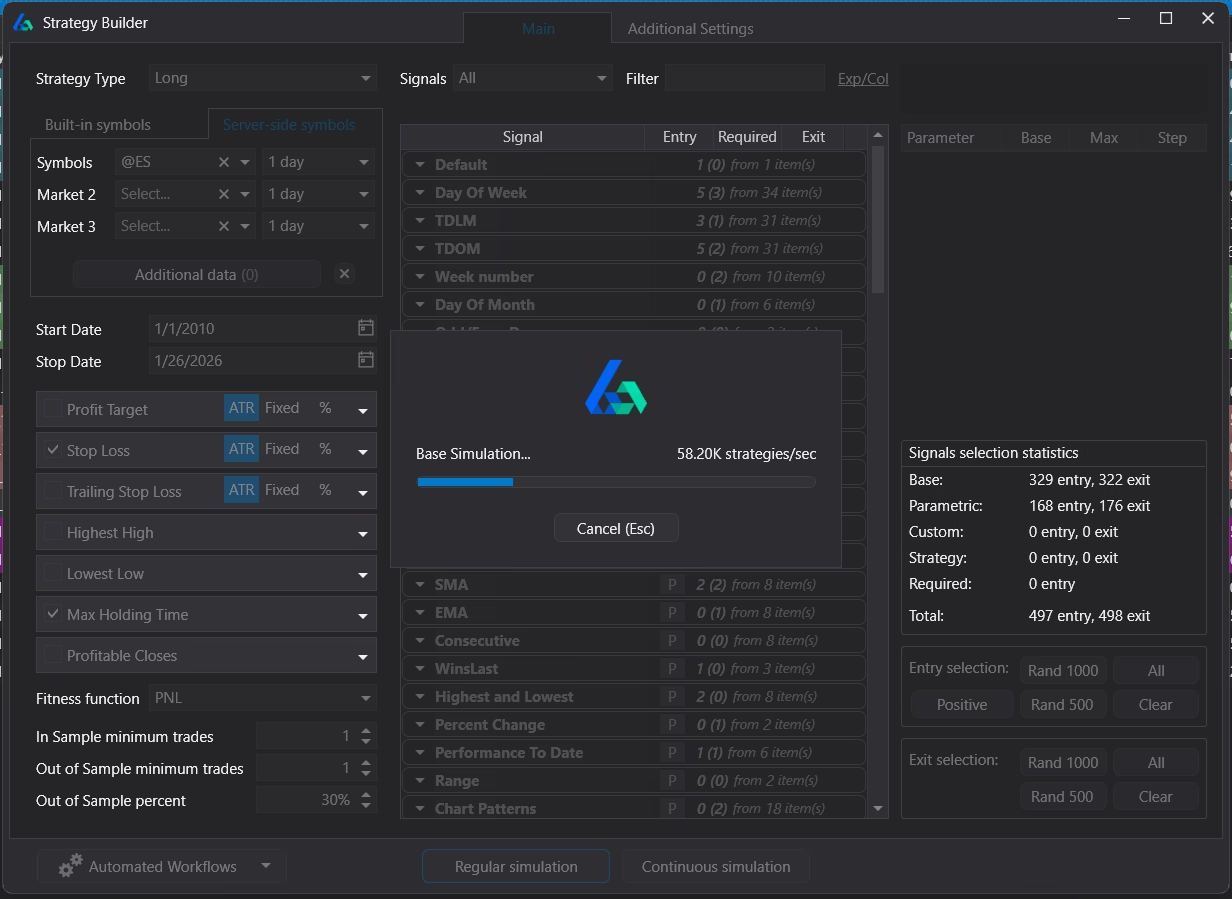
Build Alpha starts with your rules. A genetic algorithm searches for the best strategies while machine learning reviews results and modifies settings automatically.
- Market(s) and timeframe(s)
- Which signals are allowed (or required)
- Max rules per strategy
- Exit framework (hold time, stops/targets)
- Position sizing and risk management
- Fitness function selection and weighting
Explore thousands of EasyLanguage strategy combinations — without manually coding each idea, with automated validation, and without pretending a single backtest proves anything.
Connect AI to Drive BUILD ALPHA
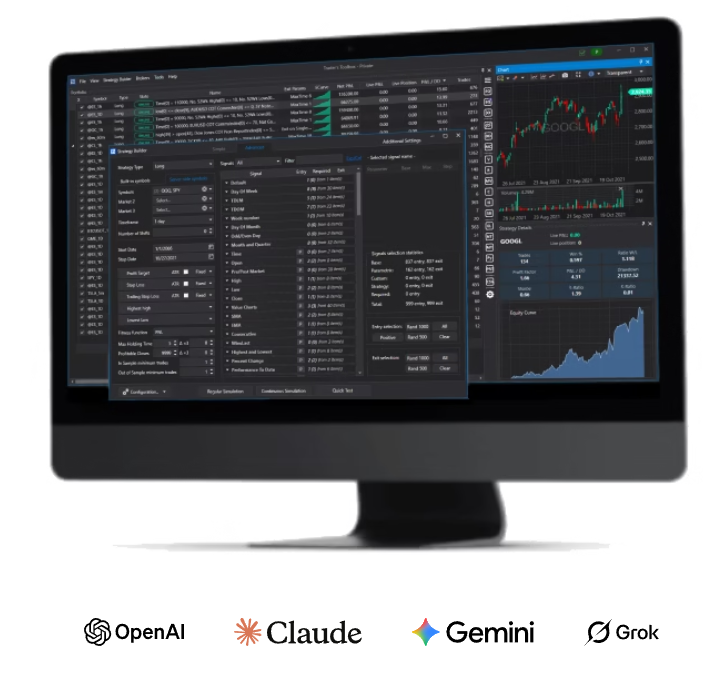
Connect your preferred AI model — ChatGPT, Claude, Gemini, or Grok — and let it automatically configure Build Alpha’s inputs, generate strategies, and optimize. AI handles the research loop while Build Alpha handles validation.
- AI selects signals, markets, and parameters
- Build Alpha runs generation + robustness tests
- AI reviews results, adjusts, and re-runs
- Survivors exported to EasyLanguage (or any platform)
Learn more about AI integration →
Claude
Gemini
Grok
Institutional-Grade Robustness Testing
Strategy creation is easy. Proving it’s real is where most traders fail.
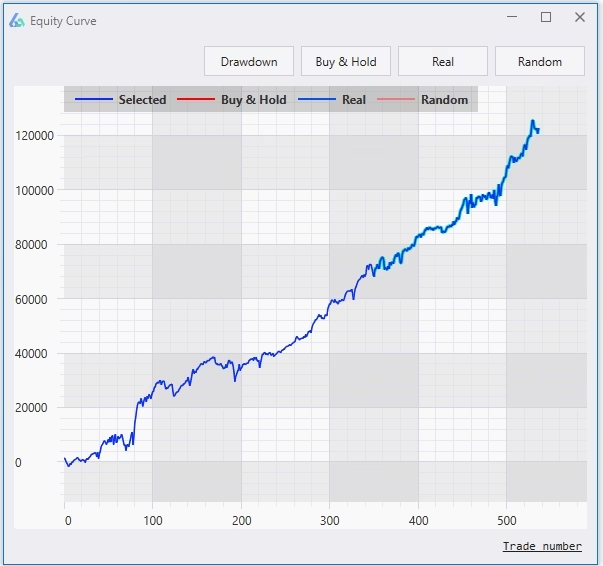
1. Out-of-Sample Testing
Reserve a portion of data so the strategy is evaluated on unseen history. If performance is consistent across both in-sample and out-of-sample, the strategy likely generalizes.
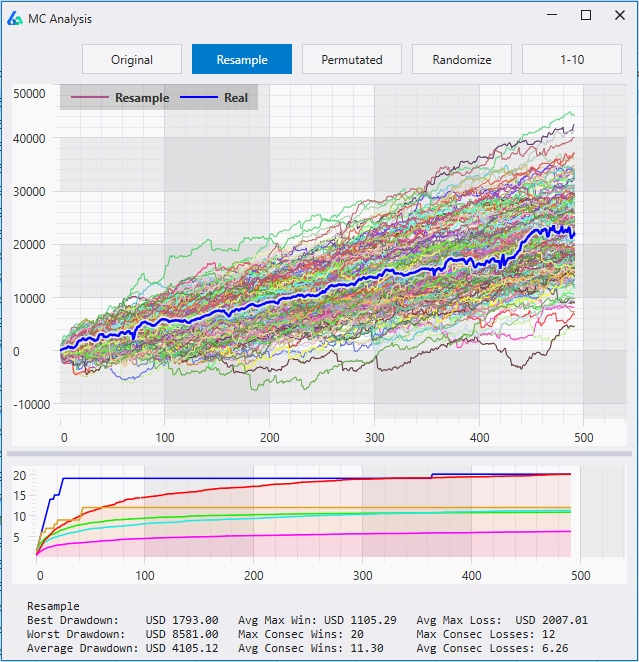
2. Monte Carlo Analysis
Reshuffle trades to understand drawdown risk and path dependency. Estimate how bad drawdowns could get and whether the backtest is unusually lucky.
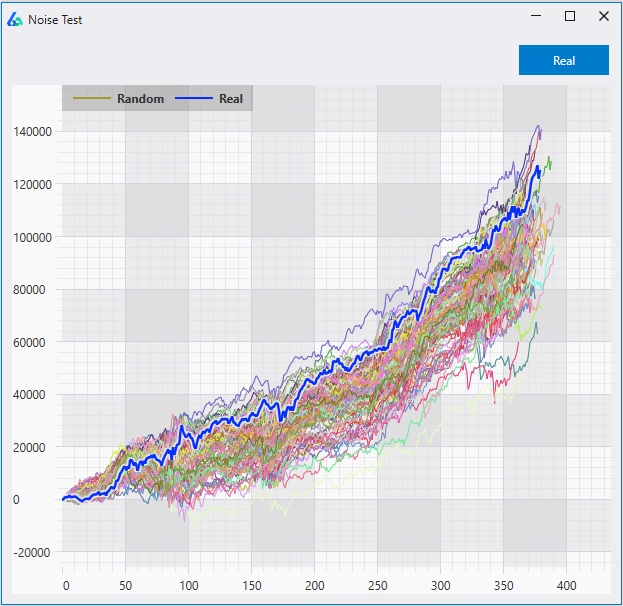
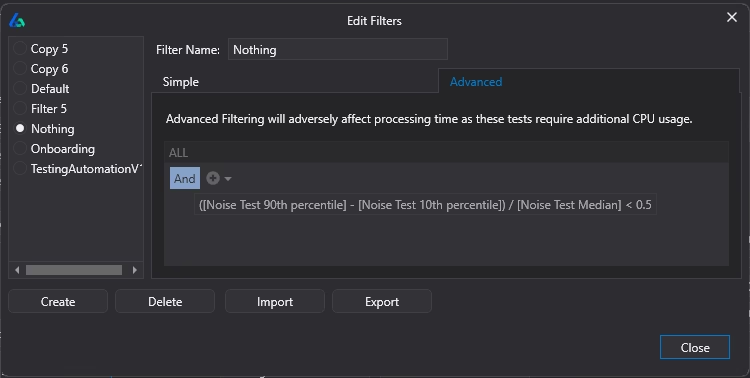
3. Noise Test (Overfitting Detection)
Slightly perturb price data and re-run the strategy to see if results survive. If small changes break it, the rules were fitted to noise — not signal.
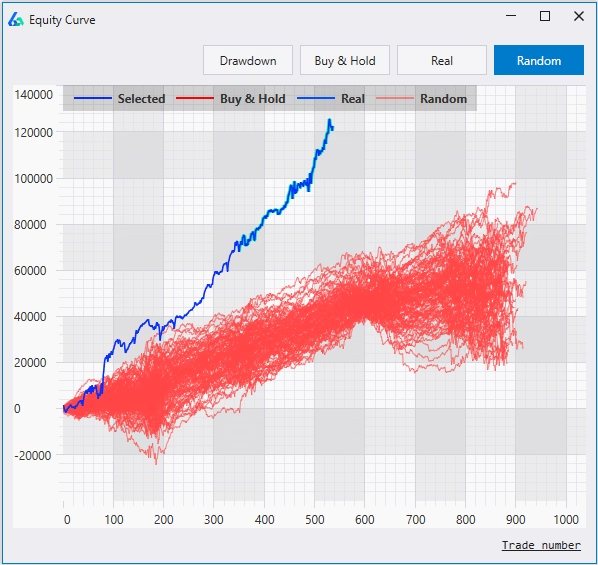
4. Vs Random Baseline
Build the best strategies using random signals, then compare yours. If your “real” strategy can’t beat the best random strategy, there’s unlikely a meaningful edge.
Automated Strategy Workflows
The hard part is reviewing and validating strategies without drowning in charts. Build Alpha automates your research pipeline:
- Set pass/fail thresholds before generation starts
- Only see strategies that pass your filters
- Auto-run robustness tests on every candidate
- Enforce minimum trade counts and risk limits
Read more: Build Alpha v3 update
Export Clean EasyLanguage Code
One-click code generation. Copy → paste → compile → trade.
{ Strategy: RSI Pullback + ATR Filter }
Inputs:
RSI_Len(14),
RSI_Thresh(30),
ATR_Len(14),
ATR_Min(0.5),
StopPts(50),
TargPts(100);
Variables:
myRSI(0), myATR(0);
myRSI = RSI(Close, RSI_Len);
myATR = AvgTrueRange(ATR_Len);
If myRSI < RSI_Thresh
and myATR > ATR_Min then
Buy next bar at market;
SetStopLoss(StopPts);
SetProfitTarget(TargPts);
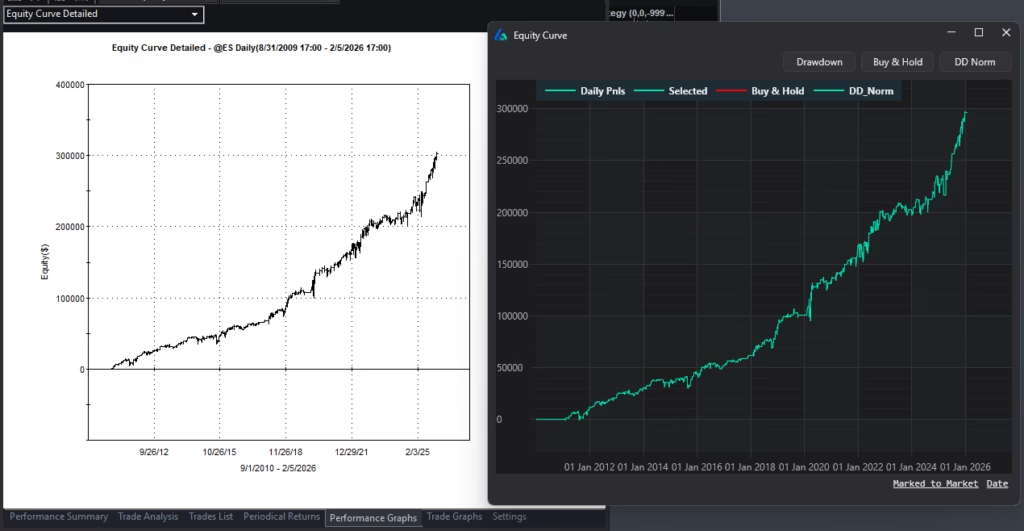
Matching Backtest Results
Research speed is wasted if deployment requires rebuilding logic from scratch.
Alternative Data TradeStation Doesn’t Provide
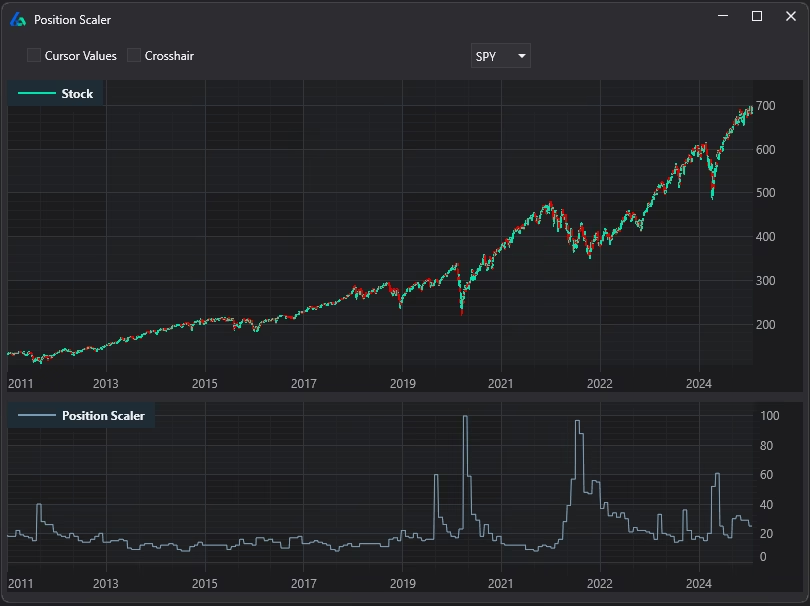
TradeStation has great historical market data, but most traders quickly hit a limitation: the built-in environment doesn’t come with a deep library of alternative data and contextual signals.
- Market breadth & internals
- Economic data & news events
- Treasury yields, spreads, VIX term structure
- COT report, Gamma Exposure, Dark Pool Index
- Weather data, Google Trends, custom imports
Generate and test strategy ideas on data that would otherwise require extensive manual wrangling. Export the final logic as EasyLanguage. You can trade these signals live.
Why Most EasyLanguage Strategies Fail
Over-Optimized Parameters
The strategy only works at very specific values. Changing one input destroys it.
Too Few Trades
“Great backtest” with very few occurrences. Probably luck.
One-Regime Wonders
Performs in one market environment, collapses in another.
Data Mining Bias
Testing thousands of combinations produces some that look great by chance.
Vs Random Benchmarking: Separating Skill From Statistical Luck
Backtesting thousands of strategies guarantees that some will look impressive purely by chance. This is known as data mining bias or multiple hypothesis testing. If you search long enough, you will eventually find a strong-looking equity curve — even if no real edge exists.
Vs Random benchmarking addresses this directly. Instead of only evaluating your strategy, Build Alpha generates large sets of strategies using randomly selected signals and data within the same constraints. These random systems are optimized using the same process and evaluated with the same metrics.
If your strategy cannot outperform the best randomly generated systems, then its performance may not be statistically meaningful.
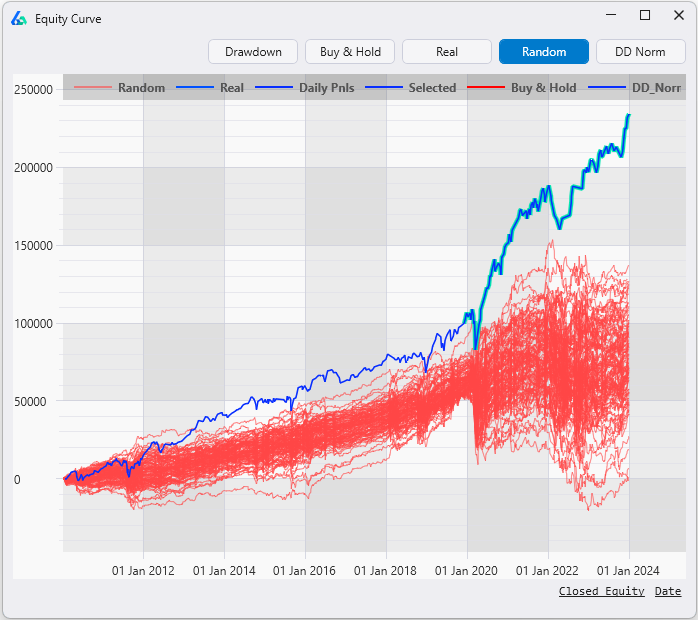
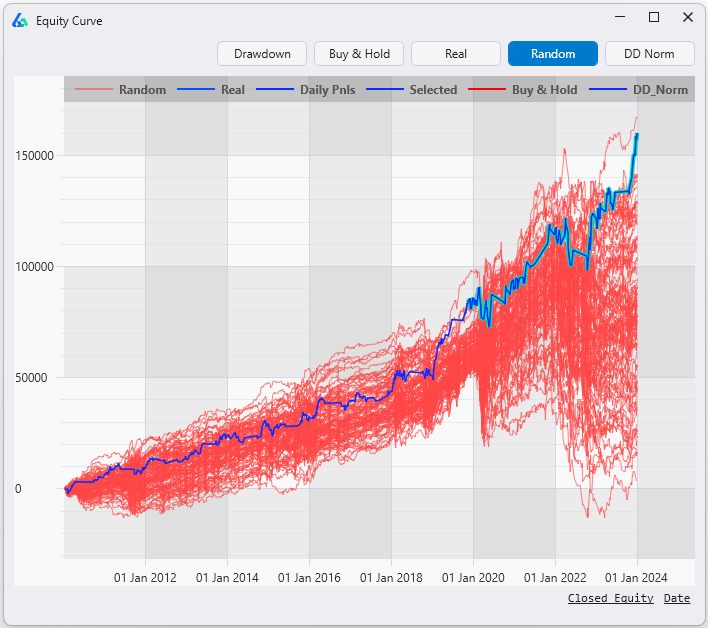
Strategy A (Pass) — the blue equity curve clearly separates from the red random strategies. This signal meaningfully outperforms chance, suggesting a genuine edge worth deploying.
Strategy B (Fail) — the blue equity curve is buried inside the red noise. This strategy doesn’t meaningfully outperform random chance and should not be deployed, no matter how good the backtest looks in isolation.
In the Lying Backtests Case Study, strategies that looked exceptional in isolation were compared against optimized random baselines. Many failed to exceed what randomness alone could produce.
Robust strategies must outperform randomness not just look good in isolation. For a complete walkthrough, see the Vs Random Test guide.
The forward performance confirmed the verdict:
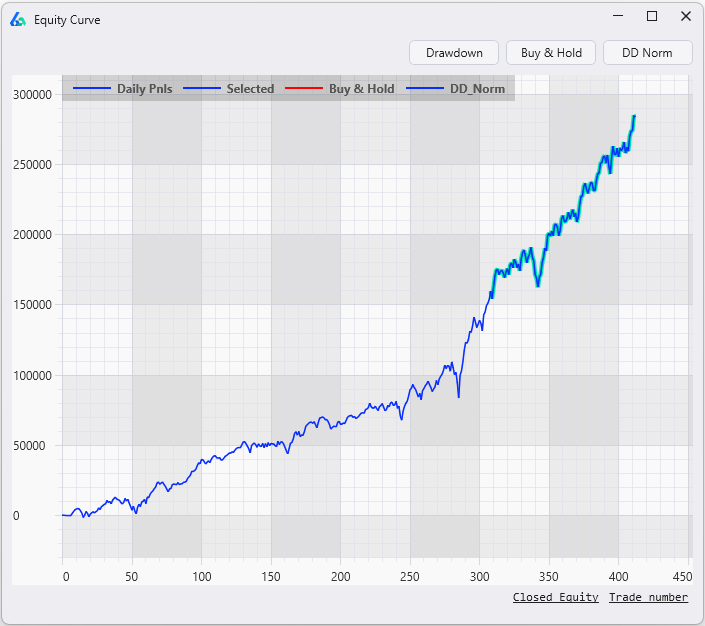
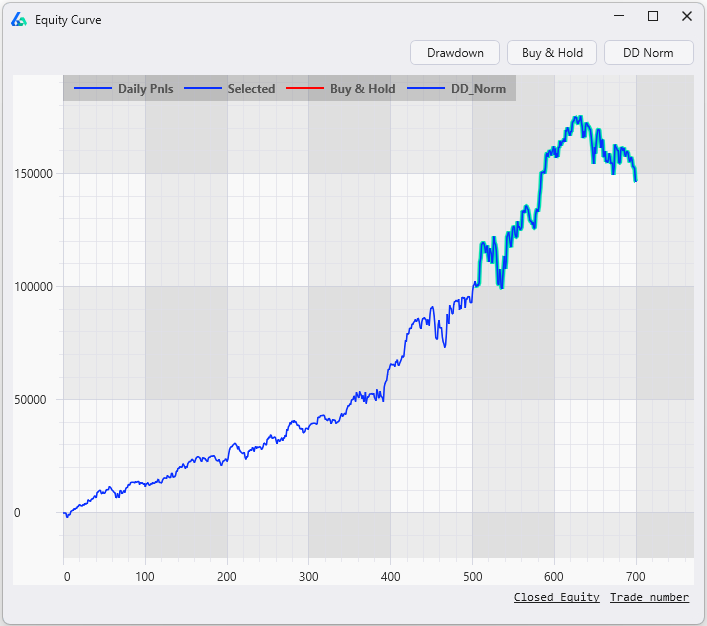
If your strategy can’t beat random, there is no edge. Most strategy generators don’t include this test. Build Alpha runs it automatically on every candidate.
Who Is This For?
Good Fit
TradeStation user who wants no-code strategy generation. Cares about robustness and avoiding curve fitting. Wants to export EasyLanguage code. Independent trader, CTA, prop firm, or institution. Systematic approach to strategy development. Wants access to alternative data and contextual signals.
Not a Fit
Looking for a pre-built strategy or signal service. Want copy-trading or guaranteed returns. Not interested in validation or testing.
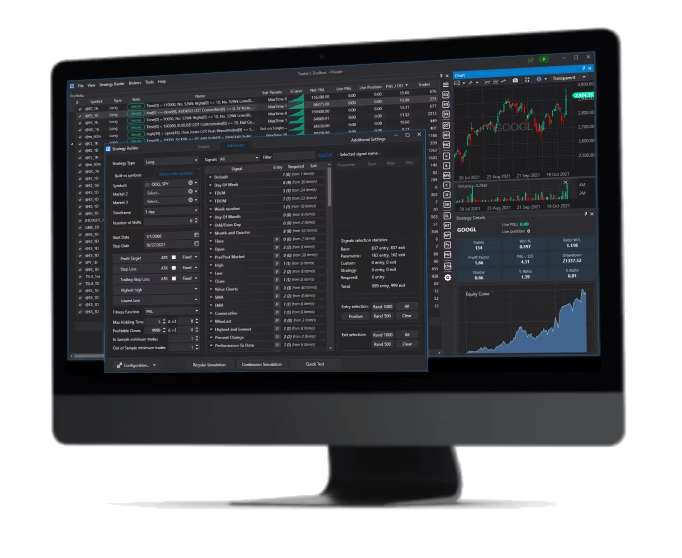
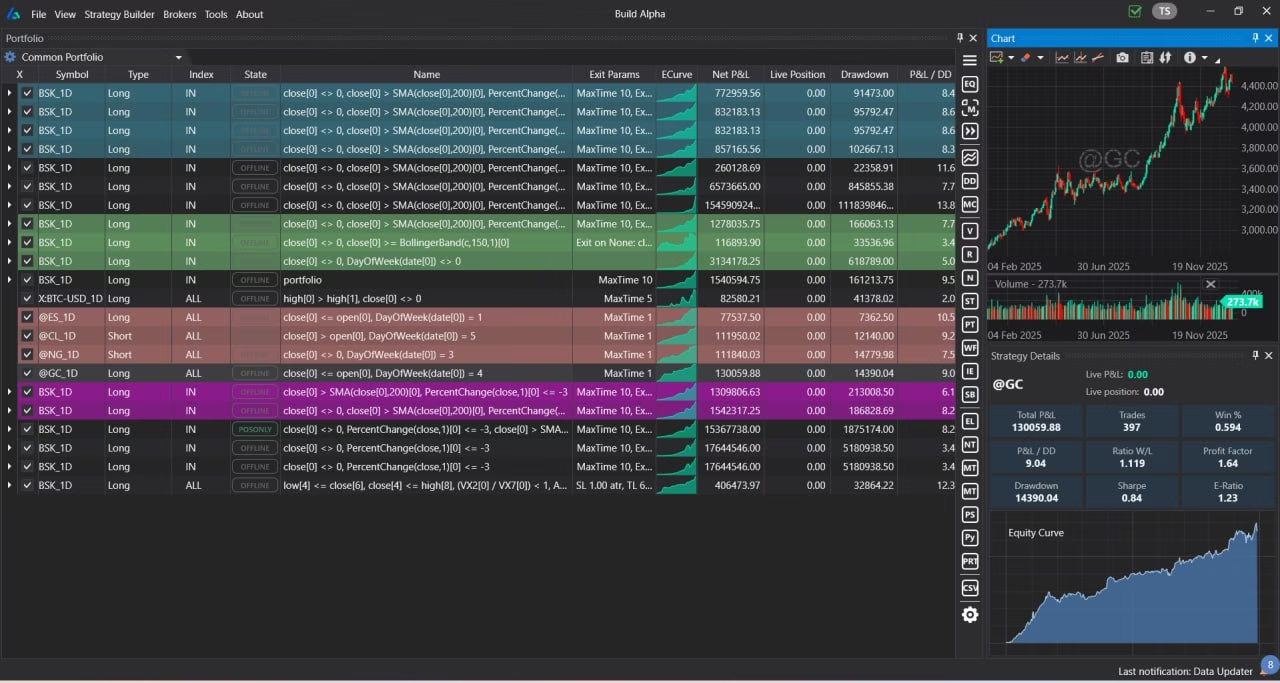
Build Alpha Portfolio View — monitor strategies, view charts, track performance metrics

TradeStation Partner Promo
Open a TradeStation account and you may be eligible for Build Alpha partner pricing through their promo program — reducing the effective cost of your license.
The Complete Guide to TradeStation Strategy Development
Everything you need to know about generating, validating, and deploying EasyLanguage strategies. Updated .
What Is TradeStation?
TradeStation is a professional trading platform widely used by independent traders, CTAs, hedge funds, and institutional desks. It features EasyLanguage for custom strategy development, RadarScreen for real-time screening, portfolio-level backtesting, direct market access across equities, options, futures, and crypto, and a mature brokerage infrastructure. TradeStation has won multiple industry awards and remains one of the most respected platforms for systematic traders.
While TradeStation excels at backtesting and execution, the bottleneck for most traders is the same: building enough strategy ideas to find real edges requires months of EasyLanguage coding and parameter tweaking. Build Alpha eliminates this bottleneck by generating thousands of validated strategy candidates that can be exported as EasyLanguage code in one click.
EasyLanguage Explained
EasyLanguage is TradeStation’s proprietary programming language for creating indicators, strategies, and studies. It was designed to be approachable for non-programmers, with syntax that reads closer to English than most programming languages. EasyLanguage is also highly compatible with MultiCharts’ PowerLanguage. Strategies written in one environment can generally be imported into the other with minimal modification.
Build Alpha generates code that works in both environments. When you click “Generate EL Code”, Build Alpha produces EasyLanguage that is also compatible with MultiCharts’ PowerLanguage — giving you deployment flexibility across both platforms from a single research workflow.
How to Build TradeStation Strategies Without Coding
The conventional approach to TradeStation strategy development follows a familiar pattern: conceive an idea, code it in EasyLanguage, backtest on historical data, tweak parameters, and deploy. This process has two critical weaknesses — it’s slow (each idea requires manual coding) and it lacks a systematic mechanism for detecting whether the backtest is genuinely predictive or simply an artifact of overfitting.
Build Alpha solves both problems. You define your strategy constraints through a point-and-click interface — selecting markets, timeframes, entry signals, exit rules, risk management parameters, and fitness functions — and the software generates, evaluates, and validates strategy candidates automatically. No EasyLanguage coding required at any stage of the research process.
What Makes the Best TradeStation Strategy Generator?
Many tools can assemble trading rules into EasyLanguage code. The best TradeStation strategy generator goes further — it must also answer the question every systematic trader needs answered: is this backtest real, or is it curve-fit noise?
Here’s what separates a credible strategy generator from a backtest factory. First, the signal library matters. A generator with 50 signals will recycle the same ideas endlessly; Build Alpha’s 7,000+ signals span price action, indicators, volume, volatility, seasonality, intermarket relationships, sentiment, economic data, and more — creating genuine combinatorial diversity. Second, the search engine matters. Build Alpha’s genetic algorithm with machine learning overlay is more efficient than brute-force grid search and less prone to overfitting than purely random exploration. Third — and most importantly — validation must be built into the workflow, not bolted on afterward. Build Alpha’s automated filter workflows ensure that only strategies passing out-of-sample testing, Monte Carlo analysis, Noise Tests, and Vs Random benchmarking are ever promoted for EasyLanguage export.
How BUILD ALPHA‘s Genetic Algorithm Generates Strategies
Build Alpha’s backend uses a genetic algorithm with a machine learning overlay to efficiently explore the vast space of possible strategy combinations. You define the search constraints and the engine systematically generates, evaluates, and evolves candidates. The genetic algorithm produces a large candidate set of diverse strategies — not just a single “best” backtest — giving you the ability to compare, filter, and validate across multiple approaches before exporting to TradeStation.
Automated filter workflows narrow the candidate set to only those strategies that pass your complete validation pipeline: performance thresholds, robustness tests, trade count minimums, drawdown limits, and stability checks. The result is fewer curve-fit backtests and more strategies that are actually worth deploying in TradeStation.
7,000+ Built-In Trading Signals
Build Alpha’s signal library covers 7,000+ signals across every major category: price action, all major technical indicators (RSI, MACD, Stochastics, ATR, Bollinger Bands, moving averages, Kaufman Efficiency Ratio, Hurst Exponent, DMI), volume, volatility, seasonality, market breadth, sentiment, yields, spreads, economic data, COT data, option flows (GEX, DIX), intermarket relationships, multi-timeframe signals, and composite indicators.
Traders can also create custom indicators through a no-code custom signal editor that Build Alpha can translate to working EasyLanguage code. Advanced users can add custom Python signals for machine learning models, alternative data, or proprietary indicators. All custom signals integrate seamlessly into the generation engine.
Alternative Data & Non-Price Signals
Most EasyLanguage strategies rely exclusively on price and volume data. Build Alpha expands the research universe with alternative data signals that are difficult or time-consuming to reproduce inside TradeStation: market breadth and internals, economic data and news events, Treasury yields and spreads, VIX term structure, weather data, Google Trends, COT report positioning, gamma exposure (GEX), dark pool index (DIX), and custom data imports via CSV/TXT.
These non-price signals give context to price-action and volume-based strategies, helping keep systems in tune with current market regimes. Build Alpha can connect directly to TradeStation for historical market data, and all alternative signals can be traded live as well — not just used for research.
EasyLanguage Code Export Process
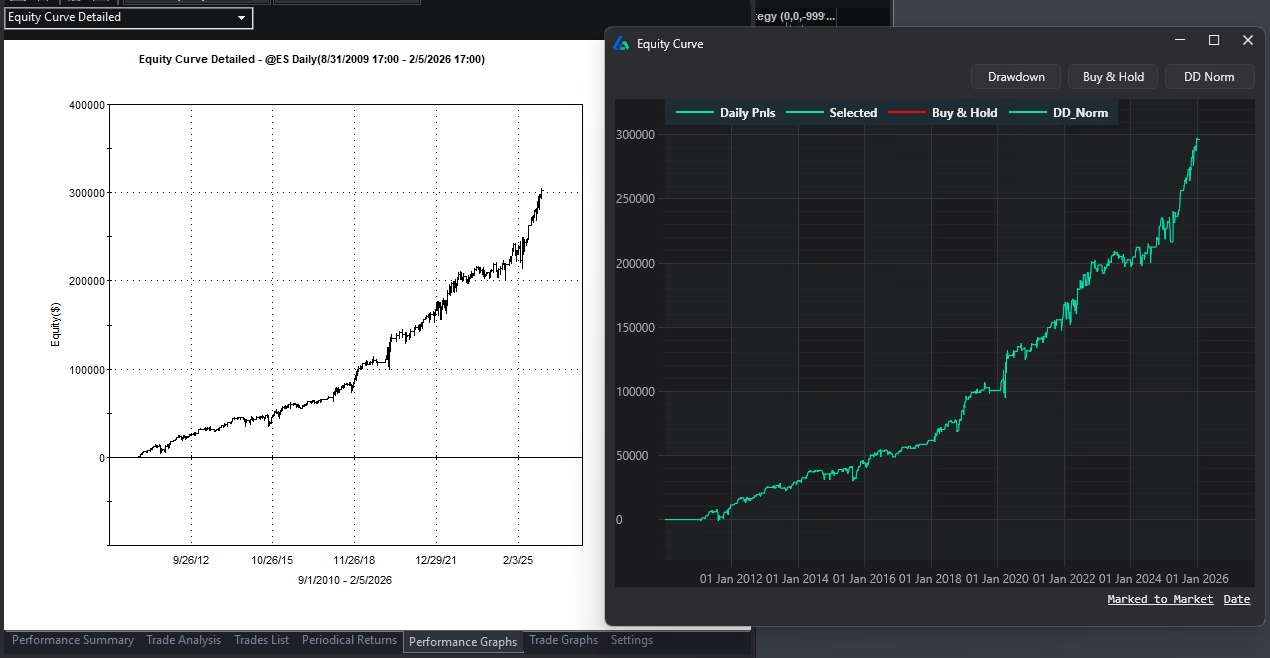
In the lower-right of the Strategy Results window, click the “Generate EL Code” button and Build Alpha produces clean, editable EasyLanguage. Open TradeStation’s Development Environment (View → Development Environment), create a new strategy (File → New → Strategy), paste the code, and compile. Apply the strategy to a chart to confirm results in your TradeStation environment. The entire process takes under a minute. For a walkthrough, see How to Backtest on TradeStation.
Build Alpha also generates code for MetaTrader 4/5, MultiCharts, TradingView, NinjaTrader 8, Python for Interactive Brokers, and ProRealTime — so your research is never locked to a single platform.
Matching Backtest Results Across Platforms
A common concern when exporting strategies is result discrepancies between platforms. Build Alpha prides itself on generating clean, portable code that produces matching results when data and settings are aligned. Differences that do appear are typically attributable to data feed variations, session/timezone handling, commission and slippage modeling, or order fill assumptions.
The key is to align your TradeStation settings — session times, commission schedules, and slippage values — with the assumptions used during Build Alpha’s generation phase. When settings are matched, results converge closely, giving you confidence that the strategy you validated in Build Alpha behaves identically in TradeStation.
Portfolio Strategy Management
Single strategies are fragile. Portfolios of uncorrelated strategies are antifragile. Build Alpha’s portfolio mode lets you combine multiple validated strategies into a single simulation using pooled (shared) capital, analyze correlation matrices, and optimize allocations across asset classes and timeframes. Each strategy in the portfolio can be independently exported as EasyLanguage code, giving TradeStation traders a modular, scalable approach to systematic trading.
Build Alpha also connects to live data feeds for strategy monitoring — including direct TradeStation integration. Track real-time profit and loss, receive position change alerts, and monitor strategy health against Monte Carlo projection bands — all from a centralized dashboard.
Frequently Asked Questions
Can Build Alpha export EasyLanguage code for TradeStation?
Yes. Build Alpha generates clean, editable EasyLanguage code at the click of a button. Copy and paste into TradeStation’s Development Environment, compile, and deploy for backtesting or live trading.
Do I need to know EasyLanguage to use Build Alpha?
No. Build Alpha is completely no-code. You define strategy parameters through a point-and-click interface, and the software generates EasyLanguage code automatically. Exported code can be reviewed or edited if desired.
Does Build Alpha replace TradeStation?
No. TradeStation is your charting and execution platform. Build Alpha is research software that generates and validates strategies faster, then exports EasyLanguage for deployment.
Does Build Alpha integrate with TradeStation data feeds?
Yes. Build Alpha can connect directly to TradeStation for historical and live market data. You can also import TradeStation-exported data files in any format.
Will exported results match exactly in TradeStation?
Results can differ slightly due to data source and differing backtest assumptions, but align your settings (session times, costs, slippage) and you will get the closest match.
Does Build Alpha support Look-Inside-Bar Backtesting?
Yes. Look-Inside-Bar Backtesting (LIBB) enhances accuracy by examining lower timeframes within a single chart bar during backtesting. It’s a configurable option in Build Alpha’s Additional Settings menu.
Can I also export to MetaTrader, MultiCharts, and TradingView?
Yes. Build Alpha supports one-click code export for TradeStation, MetaTrader 4/5, MultiCharts, NinjaTrader 8, TradingView, Python for Interactive Brokers, and ProRealTime.
What Traders Say About BUILD ALPHA












Explore More
Ready to BUILD ALPHA?
Generate strategies. Validate. Export EasyLanguage. No coding required.