ProRealTime makes it easy to run automated trading with ProOrder and test trading systems with ProBacktest—but building reliable rule-based systems still takes time, and many “good” backtests fail in live conditions. Build Alpha helps ProRealTime traders speed up the workflow:
- build trading systems in a structured no‑code environment
- validate them with robustness testing to reduce curve fitting
- then generate ProBuilder code you can use inside the ProRealTime platform for research and deployment.
If you’re new to ProRealTime’s terminology:
- ProOrder: automated/automatic trading module (server-side execution)
- ProBacktest: backtesting and optimization
- ProBuilder: ProRealTime’s programming language (for “creation by programming”)
Build Alpha’s trading software is designed to complement this ecosystem by speeding up system research and validation.

Build trading systems faster (without the ProBuilder learning curve)
Build Alpha lets you define a trading system using built-in, fully customizable components:
- market and timeframe
- entry conditions (signals + filters)
- exits (time exits, stops, targets, etc.)
- position sizing methods and constraints
- trading hours/time filters
You control the search space and rules. The result is a repeatable process for automatically generating and evaluating trading systems without hand-coding each variation. Build Alpha uses an algorithmic search process to explore rule combinations efficiently.
What Signals are available in Build Alpha?
Build Alpha has a vast library of over 7,000+ signals that cover everything from:
- price movements
- volume
- volatility
- candlesticks
- advanced technical analysis (chart patterns)
- technical indicators
- adaptive moving averages
- intermarket signals
- multi-timeframe signals
- math operators
- economic data
- weather
- news events
- COT report
- market breadth
- Google trends
- and more
Create Custom Indicators in Build Alpha to make ProRealTime complete
Traders can create their own indicators and signals through a no-code editor that Build Alpha can translate to working ProRealTime code. Read more about the Custom Signal Editor.
The BA strategy engine can access any custom indicators created during the build process and include them in the strategy generation phase alongside any selected built-in signals.
Why ProRealTime traders use Build Alpha
ProRealTime is a strong environment for charting and strategy execution—but most traders still face the same bottleneck:
- coding takes time
- testing invites curve fitting
- systems fail with new market movements
- and one “good” backtest can be misleading
Build Alpha is designed to shorten this research loop:
Generate ideas → validate robustness → export to ProRealTime
What you can do with Build Alpha + ProRealTime
Build Alpha enables the trader to achieve so much in a few clicks. First, he can research and backtest single strategy ideas. Second, he can select thousands of signals and have Build Alpha find the best automated trading systems for him. Third, Build Alpha boosts industry-leading validation and stress testing tools. Finally, BA can generate clean, fully tradeable ProRealTime code.
1) Build Trading Systems without coding
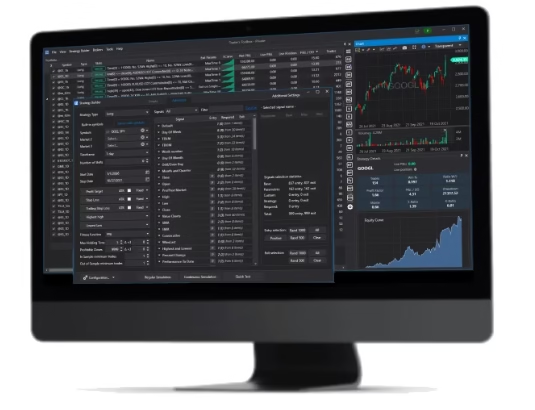
Create trading systems using point-and-click templates (signals, conditions, filters, exits, position sizing methods) from a friendly user interface. You define the constraints; the software does the heavy lifting.
2) Stress-test before you commit
Strategy creation is easy. Validation is where most traders lose time (or fool themselves).
Build Alpha supports a robustness-first workflow, such as:
- Out-of-sample validation – withhold some data from the optimization process
- Monte Carlo analysis – reorder trade history to analyze drawdown
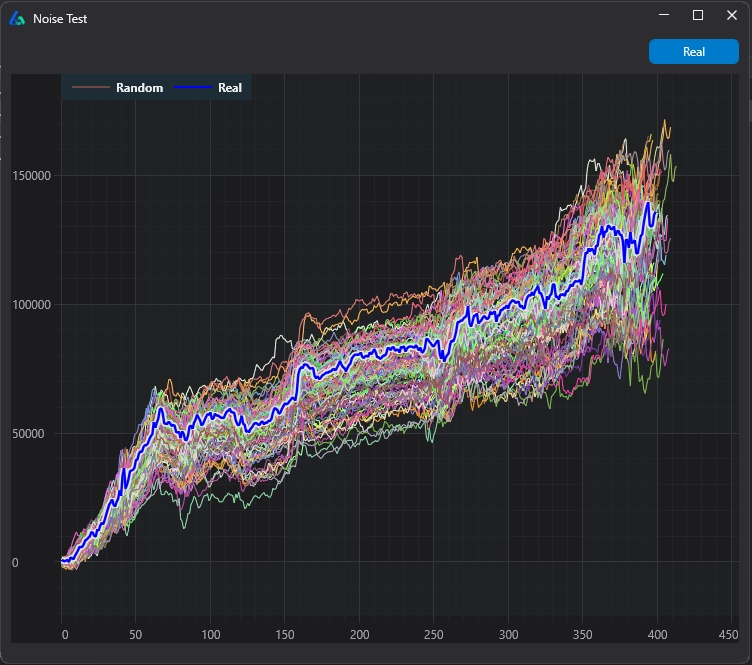
- Noise testing – create noise-adjusted data sets and retrade on all
- Vs Random / baseline comparisons – generate the best random strategy as a benchmark
The trader can automate entire workflows in BA v3
Build Alpha’s latest version includes the ability for traders to define an unlimited number of pass/fail conditions prior to starting any strategy generation process in an easy to use, user friendly interface. This includes the robustness tests mentioned above.
Read more on the following improvements in the latest update here: Build Alpha Update v3
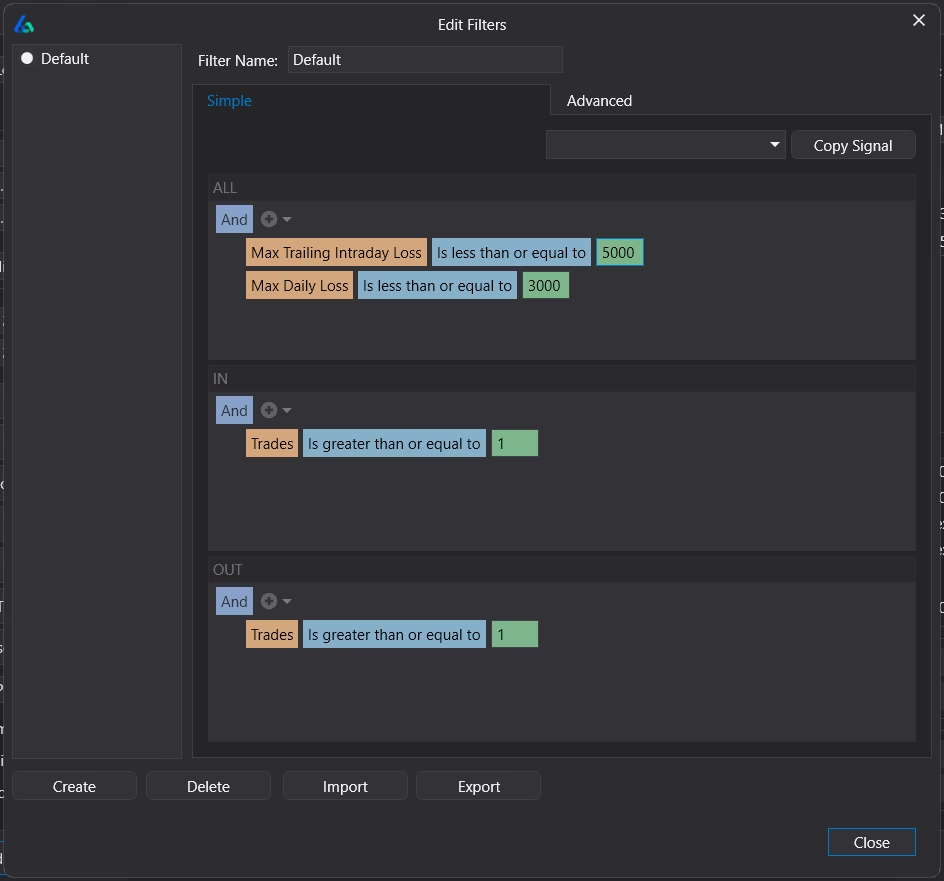
The above screenshot shows how to set automated filters in Build Alpha. These filters force the backend genetic algorithm and machine learning overlay to only produce strategies that meet the trader’s required risk and performance metrics. This is a huge time saver.
3) Export to ProRealTime Platform
Once you have trading systems that survive your rules and robustness checks, export the system’s code to ProRealTime so you can:
- run backtests in your ProRealTime environment
- compare results
- and prepare for live deployment
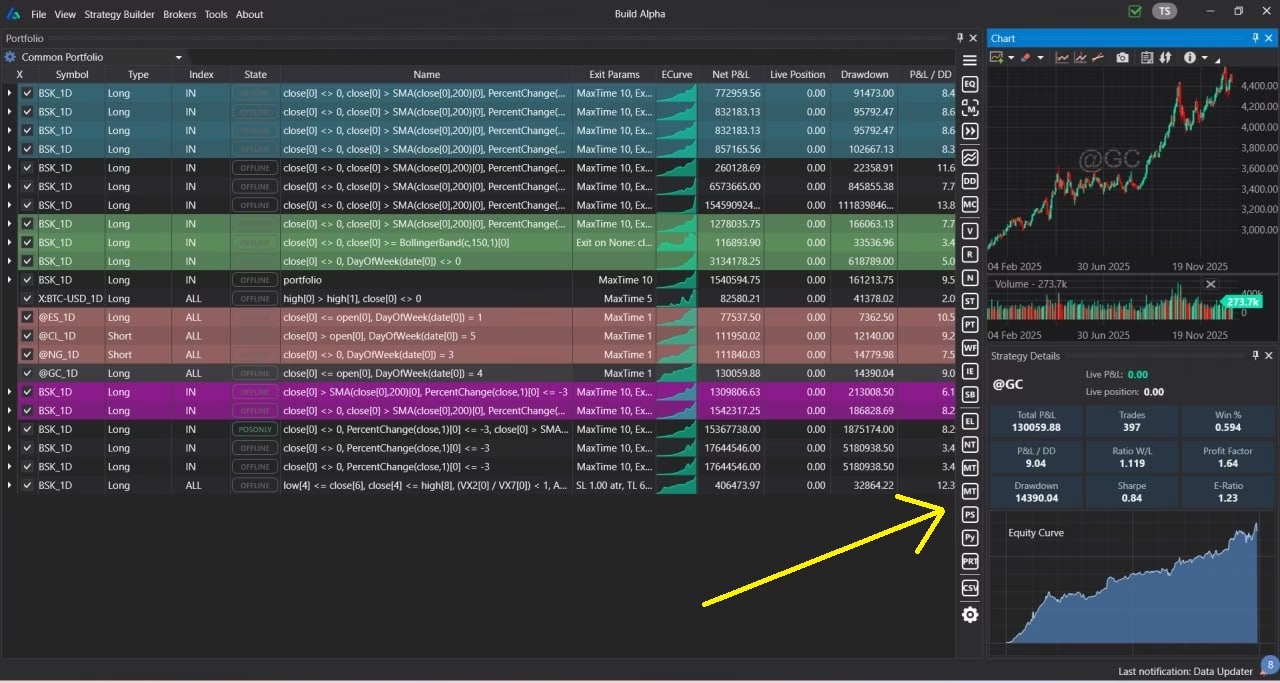
Above is a picture of Build Alpha’s portfolio dashboard for monitoring all your saved trading systems. Expand the right-hand side panel to view the validation tests and code generator buttons.
In the lower right of the Strategy Results window there are one-click buttons to generate code for popular trading platforms such as: Tradestation, Ninjatrader8, Metatrader4, Metatrader5, TradingView, Interactive Brokers (python) and of course ProRealTime.
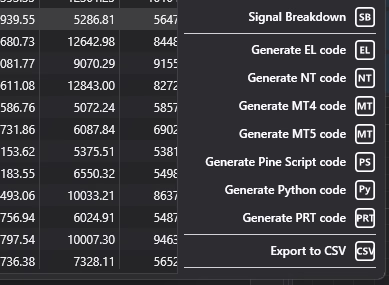
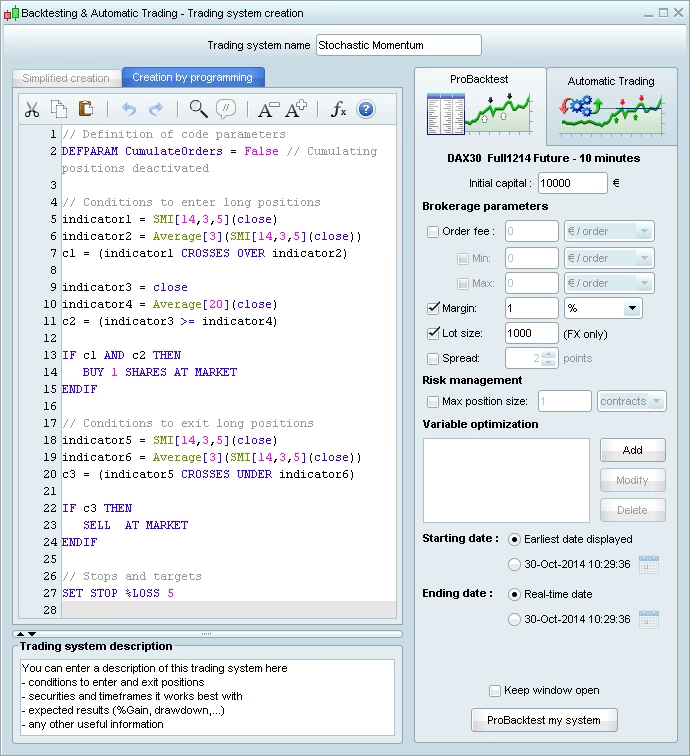
Simply copy and paste the generated code into ProRealTime and you can operate the trading system as if you coded it yourself. Load the system on PRT’s improved mini charts and watch the charts trade on real time data.
ProRealTime export: what to expect (important)
When exporting any trading system to another platform, results can differ due to:
- data feed differences
- bar construction (sessions, timezone)
- commissions/slippage assumptions
- order fill modeling
Build Alpha makes the strategy logic portable so you can get reproducible results across platforms.
The difference-maker: robustness testing before deployment
Strategy creation is easy. Validation is what prevents “lucky backtests” from becoming expensive live trades. Let’s revisit step 2 above to explain the value in incorporating this to your strategy development process.
A robustness-first workflow should include:
- Out-of-sample validation (build vs validate periods)
- Monte Carlo analysis (sequence risk, drawdowns, streaks)
- Noise testing (detect overfitting to historical noise)
- Vs Random baseline comparisons (prove you’re beating luck)
- Walk Forward Testing and Optimization
Robustness testing is how you reduce the chance that your trading experience isn’t just optimizing to one historical path or building something lucky that will simply fail when faced with real market data.
Experienced clients know that robust and simple always outperforms fragile and complex over the long-term.
Who this software is for
This is a fit if you:
- want ProRealTime automation
- don’t want to build everything from scratch
- want to diversify your build process
- care about avoiding curve fitting
- want a repeatable research workflow
- want to export strategies to the platform you trade
This is not a fit if you’re looking for:
- a signal service
- copy trading
- guaranteed performance
FAQ
Yes. Build Alpha can be used for no-code strategy generation and validation, and then you can export automated trading systems to ProRealTime.
Yes. Build Alpha supports Tradestation, Interactive Brokers, MultiCharts, Ninjatrader8, TradingView, and MetaTrader4/5 in addition to the ProRealTime platform.
No. Build Alpha is no-code trading software. Exported PRT code can be reviewed/edited if you want, but strategy creation does not require programming. Generated code handles all orders access, price alerts and can use PRT order placement interface.
They can differ due to data source and differing backtest assumptions, but align your settings (session, costs, slippage) and you will get the closest match. Results will match closely when data and assumptions are aligned.
Use robustness testing (out-of-sample, Monte Carlo, Noise Test, Vs Random, Walk Forward) and enforce minimum trade counts and stability constraints. Build Alpha has institutional-grade robustness tests for experienced traders and beginners alike.
No. Build Alpha is research software. It helps you generate and validate trading systems and then export code. It does not promise future performance and is not a single strategy (bot). BA is professional trading software finally available to all.
No, unfortunately not. This is for serious traders who understand the value of the process presented.
Build Alpha is powerful decision support tool with cutting-edge analytic tools. After generating code and configuring the strategy in ProRealTime, you can use the mobile trading features and online charting software for technical analysis to monitor your trading systems in a simulated or live trading account using a mobile device.
There are light drawn objects and tools available, but this platform is meant for automatically generating strategies and being data driven. This is exactly the way professional quants generate portfolios of strategies – not by looking at charts or drawing lines.
Build Alpha works on futures, CFDs, ETFs, stock market, and forex. The latest version of Build Alpha also supports cryptocurrencies. You can test spot gold, us stocks and futures in one simulation. You can also import any data whether European stocks, alternative data, or other markets like obscure cryptos. You can usually export from your data supplier, forex broker or cfd provider and import directly into Build Alpha, if needed.
Please check out their site as cost may vary with trading activity but it does seem there is a free version.
Nothing in this post is investment advice for any financial instrument. Such risk should only be assumed if you have sufficient financial means and take full responsibility for your experience.
Thanks for reading,
David